Free local point of sale
Download Posnic POS
Free forever for local use. No account, no trial clock, no telemetry. The database is bundled — there is nothing else to install.
Version 1.9.0 · released 30 Sept 2026
Signed release - verify the checksum before using shop data. Install notes | Checksums
Fast package choice
Start with the file your computer can run
Pick your platform, then verify the checksum before using the app with shop data. Browser-based highlighting stays on this page and does not change the release files.
Choose Windows, macOS or Linux. The local edition needs no Posnic account.
Choose your computer
One release, three desktop platforms
Select the primary package for your operating system. Alternate files stay visible underneath, along with exact sizes and the verification record.
Windows
Windows 10/11 · 64-bit · 208 MB
Download installer325 installer asset requests in the 24 Aug snapshot.
or portable - a single executable with no installer. It still stores application data in your user profile unless you deliberately configure another user-data directory.
macOS
Apple Silicon (M1 and later) · 642 MB
183 Apple Silicon DMG asset requests in the 24 Aug snapshot.
zip for
Silicon or
Intel
Apple menu → About This Mac tells you which.
Linux
x86_64 · 318 MB · no install needed
Download AppImage168 AppImage asset requests in the 24 Aug snapshot.
or
.deb
for Debian and Ubuntu —
sudo apt install ./posnic_1.9.0_amd64.deb
New in Posnic 1.8.0
An easier way to connect your desktop to Posnic Cloud, with local billing when your internet goes down.
Approve in your browser
Start a Cloud trial, sign in to an existing Cloud account, or enter a pairing code from setup. Approve the computer in your browser, then return to Posnic while your shop downloads.
Keep working offline
The first Cloud connection and shop download need internet. After setup, staff sign in locally and keep billing offline. Cloud changes sync when the computer reconnects.
Update with confidence
Existing connected tills keep their local login without authorizing again. This release also fixes automatic update metadata on macOS. Community Edition remains available for entirely offline shops.

After download
Get one counter ready without rushing live data
Install first, prove the exact workstation, then train with sample records. Keep shop data out until the device path is understood.
- VerifyMatch the package against the published SHA-256 list.
- InstallComplete the first-launch checklist before importing anything.
- TestConnect the real scanner and printer, then run sample sales before using shop records.
Not ready to install?
Try the hosted demo first
Use the public supermarket demo from the POS README. It has one-tap logins for admin, manager and cashier, a week of sample trading, and an hourly reset.
Email, SMS and password changes are disabled there, so you can test without touching real shop records.
Coming from another POS?
We move your data across, free
Products, customers, suppliers, stock and outstanding balances from Vyapar, myBillBook, Marg, Tally, GoFrugal or Excel. Send an export file, never a password.
Loaded into a copy first. It becomes your live data only after you check a sample.
Or run it on your own server
Install Posnic on a server you control
Same free software, on a machine you own, reached from a browser on any till, tablet or phone on your network. Your data stays on your disk.
One command on Ubuntu 24.04
curl -fsSL https://raw.githubusercontent.com/Posnic/POS/main/scripts/install-server.sh -o install-server.sh
less install-server.sh      # read it first
sudo bash install-server.sh
Installs Node.js, MongoDB and Posnic, runs it as a service, and prints the address to open. Needs about 2 GB of memory.
What you get
- The whole local edition, in a browser
- Several people using it at once
- Your data on your own disk
- No trial clock, no account, AGPL-3.0
What you take on
- Updates, backups and a certificate are yours to run
- Sync between separate tills or branches is not included — that is Posnic Cloud
- A server is a machine somebody has to look after
Read the self-hosting guide → certificate, firewall, backups and updates
If one person rings up sales on one computer, the desktop app above is the right answer and always will be. A server is worth it when several people need the same till data at the same time.
The product inside the package
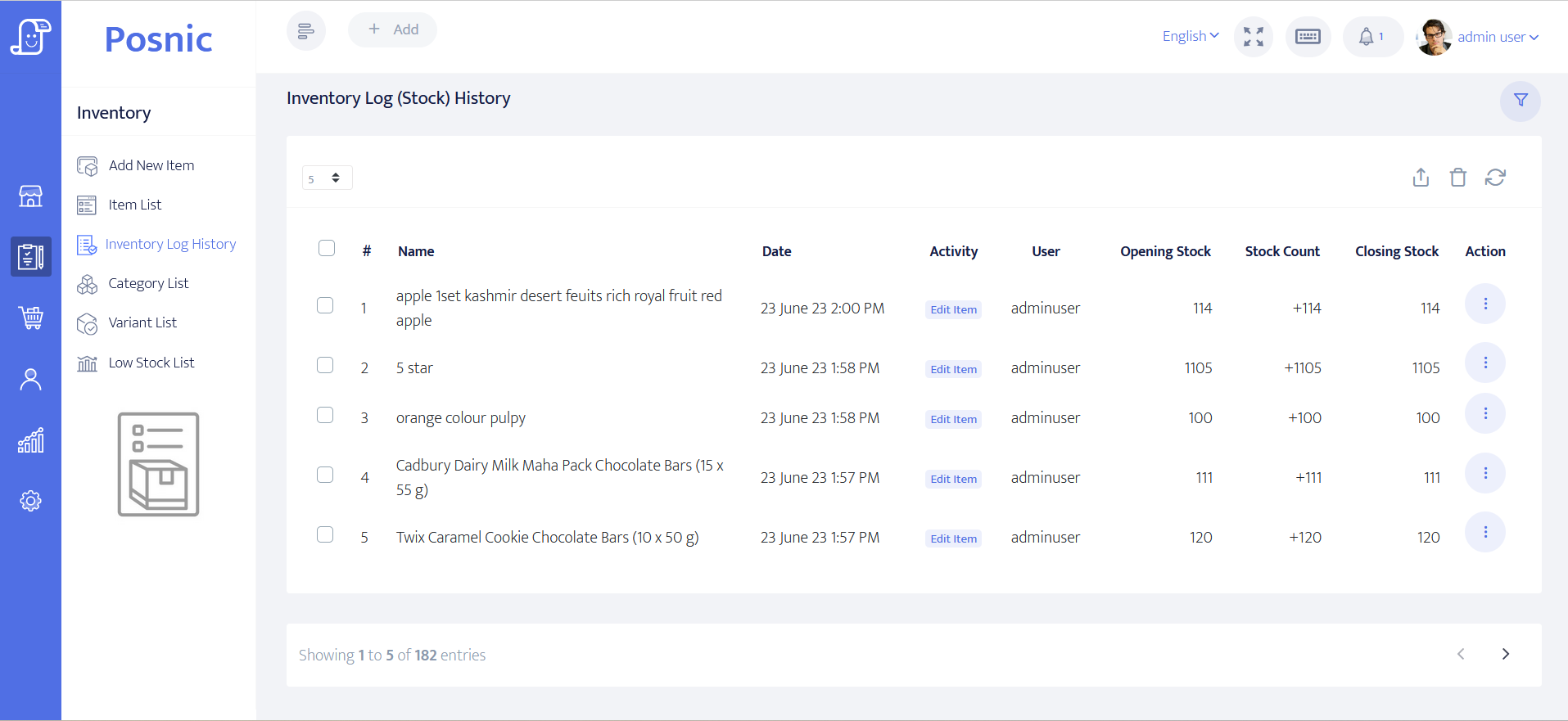
Inspect the real inventory workflow
This is a Posnic product screen, not a stock illustration. The inventory log records opening stock, movements and closing stock so a shop can trace why a quantity changed.
Public release activity
0 product-package asset requests
GitHub reported this cumulative total for the eight installable v1.9.0 files published . Snapshot captured .
- Windows
- 0
- macOS
- 0
- Linux
- 0
These are GitHub release-asset request counters, not unique people, completed transfers, installations, active devices, customers or businesses. Repeat, interrupted and automated requests may be included. Checksums, update metadata and blockmaps are excluded.
Open the machine-readable snapshot Inspect the GitHub release Check the source field
Verify before installing
Know what the package includes
Use the checksum, source and platform guidance below when the software will hold real sales or stock records.
Free means local edition
No trial clock and no Posnic account are required for the local desktop edition. Cloud sync, managed off-site backup and remote dashboards are optional services.
Database included
The desktop package includes its local database and API. Keep a tested backup away from the till because local data is your responsibility.
Checksums published
Every listed package has a published SHA-256 value. Compare all 64 characters before testing the file with business data.
Verify the exact file before you run it
The release workflow publishes a SHA-256 list for all eight installable v1.9.0 packages. A matching SHA-256 proves that your file has the same bytes as the published release asset. It does not prove that the software is safe, suitable for your shop or approved by your device policy.
Provenance boundary. macOS and Linux packages and their inventories have GitHub build provenance. Windows packages are signed and timestamped but do not have GitHub build provenance. The linked evidence file remains the earlier publisher verification record and explains what an attestation proves and does not prove. Inspect the exact evidence and limitations.
- Record the exact file name, operating system, processor architecture and published byte size.
- Compute the full local SHA-256. On Windows use
Get-FileHash -Algorithm SHA256 "path-to-file"; on macOS useshasum -a 256 "path-to-file"; on Linux usesha256sum "path-to-file". - Compare all 64 hexadecimal characters, retain the result, then test with synthetic data and a clean profile before using business records.
Download the blank 20-control verification record
The record starts with every observation, evidence, owner, review, pass/fail and follow-up field blank. Microsoft documents Get-FileHash; platform warnings still require a separate security decision.
Signed installers and platform checks
The v1.9.0 release notes describe Windows as signed and timestamped, and macOS as signed and notarized. If your operating system still warns about publisher identity, stop and verify that you downloaded the file from this page or the linked GitHub release.
Windows. SmartScreen also uses reputation information, so a new app can still trigger extra caution on some devices. Check the publisher, checksum and source before allowing the file. On a managed computer, follow the administrator's decision. Read Microsoft's current App & browser control guidance.
macOS. Gatekeeper should recognize the signed and notarized build. If macOS blocks a file, verify the checksum and source before continuing. Apple warns that overriding this protection can expose the computer to malware; read Apple's current safe-app guidance. Do not remove the quarantine attribute with a terminal command.
Linux. The GitHub release includes checksum files and detached GPG signatures for the direct AppImage and Debian package. The release notes also point Linux users to the signed APT repository for ongoing updates.
Start from this canonical page or its linked GitHub release and check your file against SHA256SUMS.txt before installing. Keep your own backups because any POS release can hold sales records.
Inspect and build the pinned source
The whole application is AGPL-3.0 open source. The public v1.9.0 packages use the release tag. macOS and Linux are built in GitHub Actions; Windows is built and signed locally with the publisher's hardware certificate. Pin the source input before installing dependencies:
git clone --branch v1.9.0 --depth 1 https://github.com/Posnic/POS.git
cd POS
git rev-parse HEAD  # expect 53f24d7508b56053bcf30fe0e0d9e2c7eda09740
npm ci
npm --prefix frontend ci
npm --prefix api ci
npm test
A complete installer also needs the platform-specific bundled MongoDB and packaging preparation. Follow the pinned release workflow. The successful v1.9.0 release run checked out the application tag in its macOS, Linux and publish jobs, using the corrected signing workflow. Windows packages were signed and timestamped locally. A local build is not assumed to be byte-identical to the published artifact because the runner, dependencies and packaging environment also matter. Inspect the reviewed source commit.
Connect this computer to Posnic Cloud
In setup, start a Cloud trial or connect your existing Cloud account. Posnic opens your browser so you can sign in and approve this computer. You can also use a pairing code. After the shop downloads, return to Posnic and sign in with your local staff account.
Internet is needed for the first connection and download. Daily local sign-in and billing work offline after setup. Prefer an entirely offline shop? Choose Community Edition; no Cloud account is required.
All releases, checksums and release notes are on GitHub. Problems? See Support for the current contact and escalation paths.
Download questions
Is Posnic POS really free to download?
Yes. The local desktop edition is AGPL-3.0 open source with no trial clock. Optional cloud sync, managed backups and remote dashboards are separate paid services.
Which operating systems can run Posnic?
v1.9.0 publishes Windows x64 installer and portable files, macOS builds for Apple Silicon and Intel, and Linux AppImage and Debian packages.
Does the Windows portable build leave data on the computer?
The file needs no installer, but Posnic still creates application data in your user profile unless you deliberately configure another user-data directory. Portable does not mean stateless.
How can I verify a Posnic download?
Choose the exact operating-system and architecture file, then compare its full local SHA-256 with SHA256SUMS.txt. A matching hash proves byte identity with the published asset, not safety or shop suitability.