Counter billing or POS
Records an immediate sale and often connects item selection, price, tax, payment, receipt, stock and shift close. Hardware and outage behavior may be part of the decision.
Open-source POS billing evaluation
A fast bill is useful only when the business can explain it later. Test what was sold, price and tax, payment status, stock movement, corrections, closing totals and recovery before choosing a product from its feature list.

Publisher disclosure: Posnic Innovations Private Limited makes Posnic POS and publishes this page. It does not independently rank billing-software vendors, and this guide does not name one universal best product.
Demand reviewed 2026-08-25. A fixed private Search Console cohort contains nine generic billing and POS-billing queries with 260 impressions and zero clicks. A direct six-seed capture preserved 60 Google and 62 Bing suggestion responses around price, free and open-source software, PC, inventory, retail, restaurant, small-business, online and location intent. Suggestions are not search volume, ranking or conversion evidence, and the private cohort has no landing-page dimension.
Product evidence reviewed 2026-08-25. This guide uses archived Posnic evidence snapshots, a 49-check synthetic counter session, a separate 21-check inventory lifecycle, one synthetic backup and restore, 37 rerun receipt and report source tests, product documentation and primary invoice, barcode, payment and security sources.
Stable release: v1.9.0. No clock-length counter shift, physical receipt print, barcode scan, processor settlement, tax acceptance, customer migration or production cutover was executed.
Current results and official product pages still mix these categories. Start with the record and operating decision your business needs, then verify whether one system or an accepted integration owns it.
Records an immediate sale and often connects item selection, price, tax, payment, receipt, stock and shift close. Hardware and outage behavior may be part of the decision.
Creates a request for payment, often with due date, customer identity, terms, reminders, credit notes and receivables status. It may not manage a checkout counter or perpetual stock.
Maintains ledgers, control accounts, financial periods and statements. A POS total is an input to reconcile, not evidence that correct accounting entries were posted.
Can span purchasing, inventory, production, finance, people and other operations. Ordinary billing fields do not establish manufacturing, project, payroll or enterprise-planning workflows.
Intent boundary: this page owns broad billing-software evaluation. Free billing-software acquisition, inventory-led evaluation, retail stock-to-cash, GST acceptance and Posnic pricing remain distinct tasks.
Stable sale or invoice number, timestamp, branch, counter, operator and original line items.
Product or service identity, description, unit, quantity and any serial, batch or variant required by the workflow.
List or agreed price, approved discount, promotion, override reason and the person authorized to change it.
Taxable value, rate or category, amount, exemption or reverse-charge treatment and jurisdiction-required particulars.
Tender, amount, change, provider reference, credit or balance due, plus uncertain and refunded states.
Return, credit, cancellation or edit linked to the original record, reason, authorization and financial effect.
Receiving, sale, return, damage and adjustment connected to item, branch, quantity, user and reason.
Shift totals compared with cash, payment-provider and credit evidence, with every difference assigned.
Export, backup, retention and tested restore evidence that can reproduce representative records after failure.
Prepare a small reference set with predicted results. Compare the transaction, independent payment evidence and stock record instead of trusting one screen in isolation.
| Test | Expected business result | Evidence to retain |
|---|---|---|
| Release and configuration | The exact application, tax, currency, timezone, numbering and permission setup is reproducible. | Version, source or installer hash, configuration export and approver. |
| Normal sale | Items, quantities, price, discount, tax, total and payment agree across all records. | Sale ID, receipt, transaction row, stock movement and close report. |
| Discount and override | An approved discount works and an unauthorized price change is blocked or traceable. | Role, input, calculation, reason and audit record. |
| Invoice and tax | The sample contains every current required particular and calculation for the target market. | Dated sample and named qualified tax or accounting approval. |
| Cash and change | Cash received, change, drawer expectation and close total reconcile. | Receipt, expected cash, actual cash and difference reason. |
| Electronic payment | Approved, declined, timeout, duplicate and uncertain cases have one controlled outcome. | POS record, terminal or provider reference, settlement and refund evidence. |
| Credit or amount due | Customer, due amount, payment history and later settlement stay traceable. | Customer ledger or accepted external receivable record and reconciliation. |
| Return and cancellation | The original transaction, refund, tax, stock and authorization remain linked. | Original and correcting IDs, reason, approval and resulting reports. |
| Receiving and stock | Known receiving, sale, return and adjustment quantities reconcile for one item. | Purchase reference, movement history, count and variance explanation. |
| Day close and export | Filters, timezone, branch, staff and tender totals match the reference set and exported rows. | Close report, export hash, row count and independent recomputation. |
| Outage path | Each local, network, payment, printer and cloud dependency behaves according to a written fallback. | Timed drill, unavailable functions, queued work and recovery result. |
| Backup and restore | A separate backup restores representative items, sales, settings and reports to the expected state. | Backup hash, storage location, restore log, counts, elapsed time and approval. |
A compressed synthetic API session saved 12 sales covering 20 units, returned one unit, reconciled INR 2,622 net sales, payment labels, stock and the graphical report, then closed the register with no open session. It was not a packaged screen, clock-length shift, physical cash count or external payment.
A separate run reconciled 100 opening units plus 20 received minus two sold plus one returned to 119. Duplicate sale and return replays did not move stock twice. It was not a physical count, scanner test, multi-till race or full trading day.
Thirteen column, eight receipt, eight daily-report, five local-asset and three sales call-path checks passed at the exact pinned commit. They cover source formatting, 58 mm and 80 mm text bounds and local print assets, not a physical receipt or business acceptance.
The disposable profile restored 20 collections and 53 documents with matching totals. It did not test a production database, lost disk, encrypted archive, retention policy or replacement computer.
No physical receipt printer, barcode scanner, cash drawer, scale or payment terminal was connected in this billing review. Use the pinned hardware matrix and test the exact make, model, connection and workflow.
No complete counter day, customer production data, tax certification, provider authorization or settlement, multi-branch concurrency, physical stocktake, customer migration or production cutover is claimed. The blank worksheet is where one business records its own result.
Acceptance rule: a difference is not solved by changing the report until it matches. Preserve the original result, identify the source, record the correction and keep named approval.
A zero software price does not make the counter, payments, support or recovery cost zero. Assign each cost before a pilot becomes a dependency.
Posnic documents the local Community Edition at USD 0 with no timed trial. Posnic source is AGPL-3.0-only, while packaged builds also include separately licensed dependencies. Record upgrade and maintenance ownership.
Computer, printer, scanner, drawer, scale, terminal, replacement devices, processing, chargebacks and connectivity remain separate costs and acceptance paths.
Include setup, migration, training, support, security, backups, restore drills, downtime, tax review, exports and the work needed to leave or replace the system.
Decide which system owns sale, invoice, payment, receivable, stock and accounting records.
List invoice fields, numbering, tax, currencies, units, tenders, permissions and retention obligations.
Use representative items, customers, tax cases, payments, returns and stock with predicted totals.
Test normal and exception paths with the exact roles, printer, scanner and payment arrangement.
Compare transaction, payment, stock and accounting evidence; recompute exports independently.
Run controlled network, provider, printer and cloud outages and document every fallback.
Use separate storage, measure recovery and compare item, sale, setting and report counts.
Assign every gap, workaround and deadline, then obtain operations, finance, tax and owner approval.
These are real Posnic screens shown in full. They reveal surfaces to test and do not imply that the records reconciled across a complete business day.
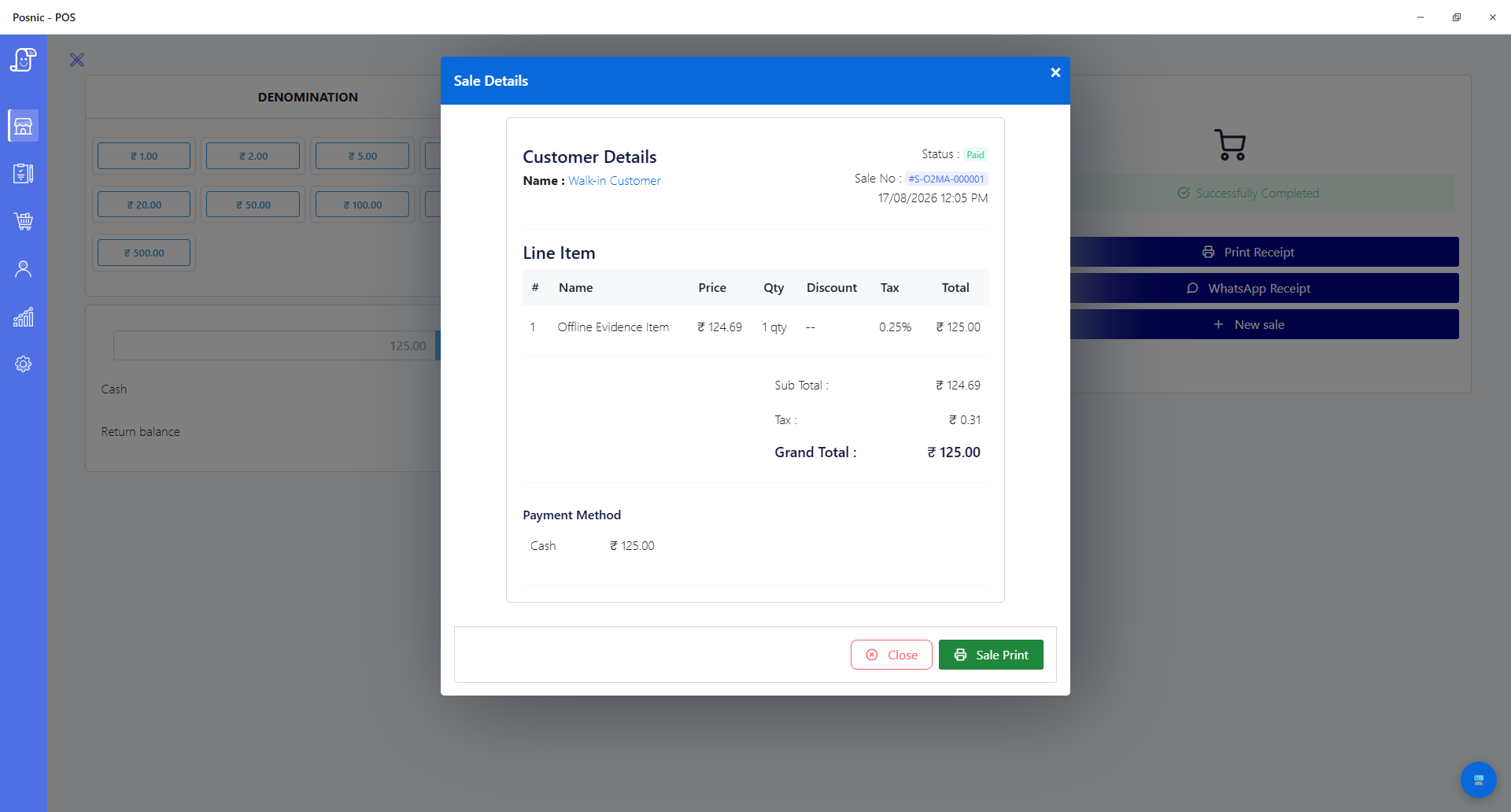
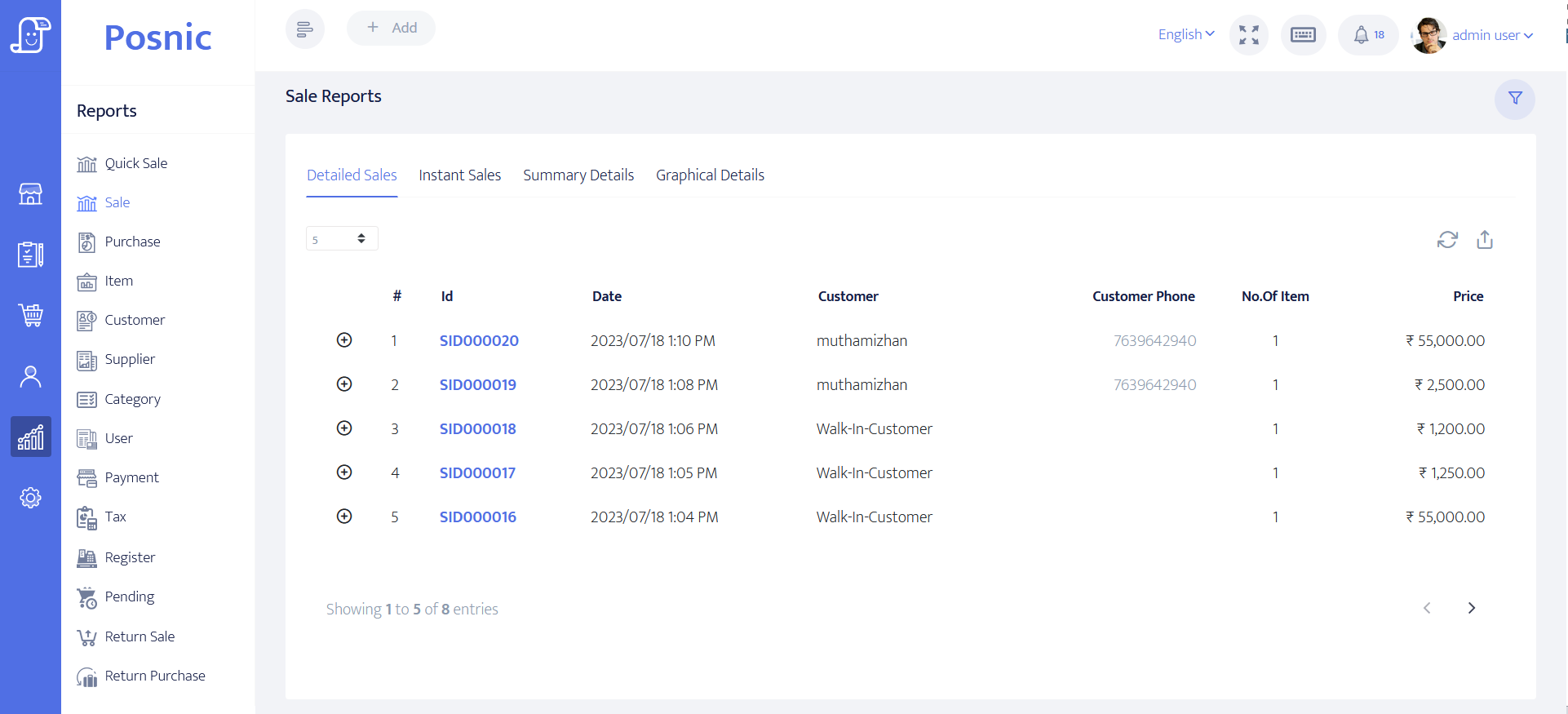
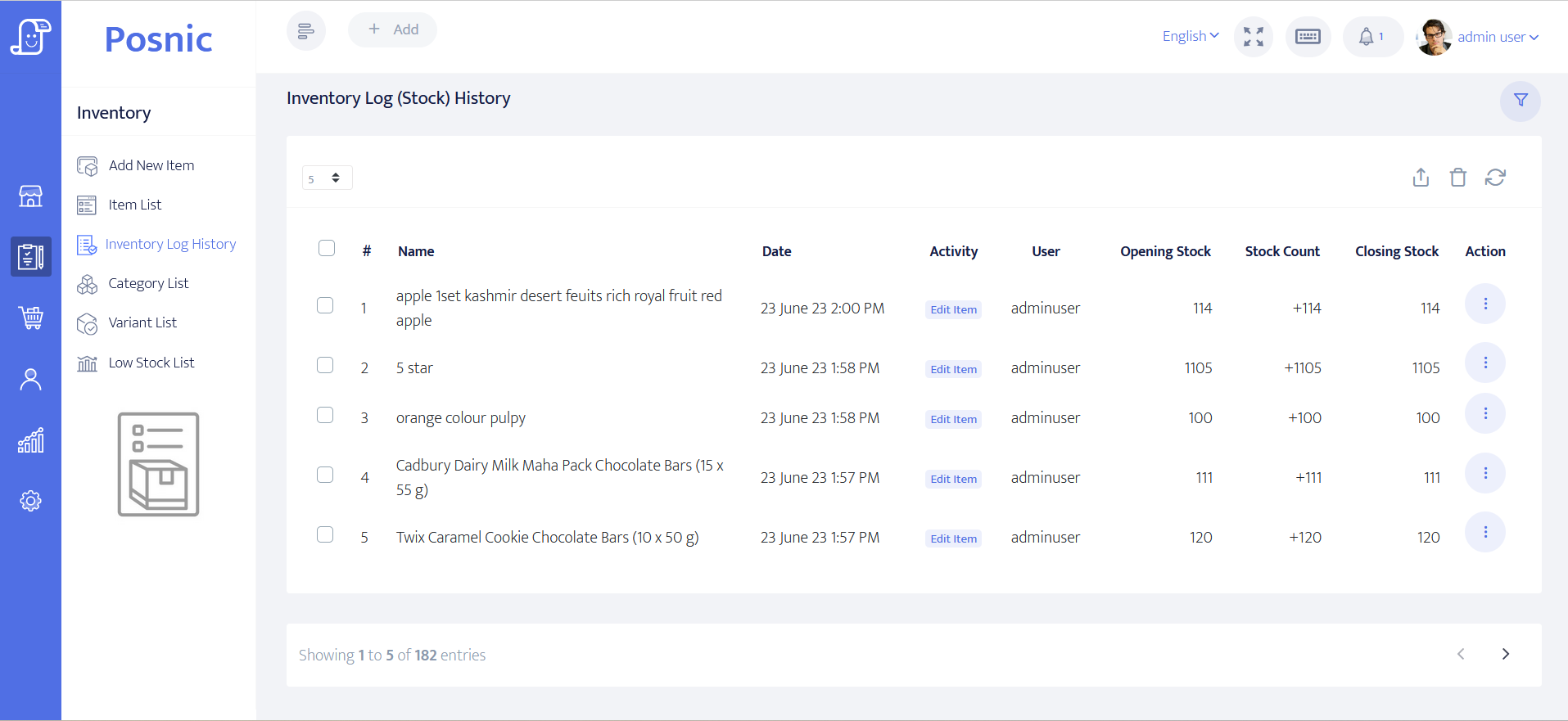
A template can look professional and still omit a required field or use the wrong tax treatment. Review current official rules for every market and sale type, then preserve dated accepted samples.
CBIC publishes GST invoice rules with required particulars and special cases. Determine current applicability, electronic-invoice obligations and retention with qualified advice.
GOV.UK publishes general invoice particulars and separate VAT invoice requirements. A till receipt, simplified VAT invoice and full VAT invoice can have different rules.
The European Commission summarizes EU VAT invoicing rules and credit-note references. Member-state and transaction-specific requirements still need review.
Posnic does not claim GST, VAT, sales-tax, electronic-invoice or fiscal-device certification. Country support must be based on accepted output from the exact release and configuration.
PCI SSC merchant resources frame payment security across people, process and technology. Confirm processor, acquirer, terminal, network, validation and incident responsibilities.
GS1 documents EAN/UPC use at retail POS. The shop must still verify item mapping, unit, price, duplicate handling, label quality and the exact scanner.
CISA small-business resources cover practical cyber and resilience controls. Keep separate copies, access control, retention, tested restore and an incident owner.
The worksheet covers release, record ownership, item data, invoices, tax, cash, electronic payment, credit, return, receiving, stock, close, exports, permissions, hardware, outages, backup, restore and qualified approval. Observation and decision fields are blank so the file cannot present an unexecuted trial as passed.
The public stable release and package boundary used for this review.
The exact receipt, report, local-asset and sales call-path files used for the 37-test rerun.
Public evidence for the bounded counter, inventory and backup observations.
Official India source for GST invoice particulars and related cases.
Official UK guidance for invoices and the additional information required on VAT invoices.
Official EU overview for VAT invoice requirements and credit-note references.
Primary payment-security material for merchant responsibilities and PCI DSS scope.
Primary barcode context for retail point-of-sale identification and scanning.
Primary US government resources for practical cybersecurity and resilience planning.
The official project page is a current category reference for stock, tax, register logging, invoicing, cash-up, receipt output, permissions, reporting, installation and hardware boundaries. It does not rank Posnic or establish feature parity.
The terms overlap, but billing software usually emphasizes sale or invoice records. A POS may also include counter hardware, payments, stock, purchasing, staff controls and operational reports. Compare the required records and tested workflow rather than the label.
Not necessarily. Invoicing can focus on amounts owed and collection; accounting maintains ledgers and financial statements; counter billing records a sale at checkout. One product may combine them, but the buyer must test the actual posting and reconciliation boundaries.
No. A local sale may continue while card authorization, hosted ordering, remote dashboards, support, updates or cloud synchronization still need a network. Test every dependency separately.
No certification is claimed. Posnic contains tax and invoice fields, but each business must verify required particulars, numbering, tax treatment, electronic invoicing and retention with current rules and qualified local advice.
No. Reconcile the POS transaction with cash evidence or the payment provider and acquirer record. Test timeout, duplicate, uncertain, refund and settlement-difference cases.
No universal hardware claim is made. The pinned release has source and protocol evidence with stated limitations, but no physical printer or scanner was connected in this billing review. Test the exact make, model, connection and workflow.
Run representative sales, discounts, tax, cash and electronic payments, credit, returns, receiving, stock, day close, reports, permissions, outages, backup and restore on the exact release, computer and hardware planned for the counter.
Posnic Community Edition archived evidence run has a 49-check synthetic counter session, a separate 21-check inventory lifecycle, one synthetic backup and restore, 37 focused receipt and report tests, and inspectable source. It does not have accepted evidence for a complete counter day, physical receipt, physical scanner, processor settlement, tax certification, customer migration or production cutover. Use the worksheet to decide whether the current release fits a bounded pilot.
Download Community Edition/Review pricing/Ask for setup help