Product capabilities and evidence
POS software features and verified workflows
Inspect Posnic POS before you choose it. Review checkout, inventory, reporting, offline and cloud workflows against published evidence and test boundaries.
See real product screens, reproduced checks, unproved areas and the counter tests your business should run before rollout.
Review and source notes
Publisher disclosure: prepared by Posnic Innovations Private Limited, the Posnic publisher. First published 17 August 2026; demand and owner review updated 25 August 2026; product evidence updated 21 August 2026. Review the method and correction policy.
Source provenance: the archived evidence commit identifies Sridhar Bala as its author, and the project governance states that Posnic currently has one effective maintainer. This identifies product-source provenance, not an independent review or a personal article byline.
Inside Posnic POS
Stock movement and reports
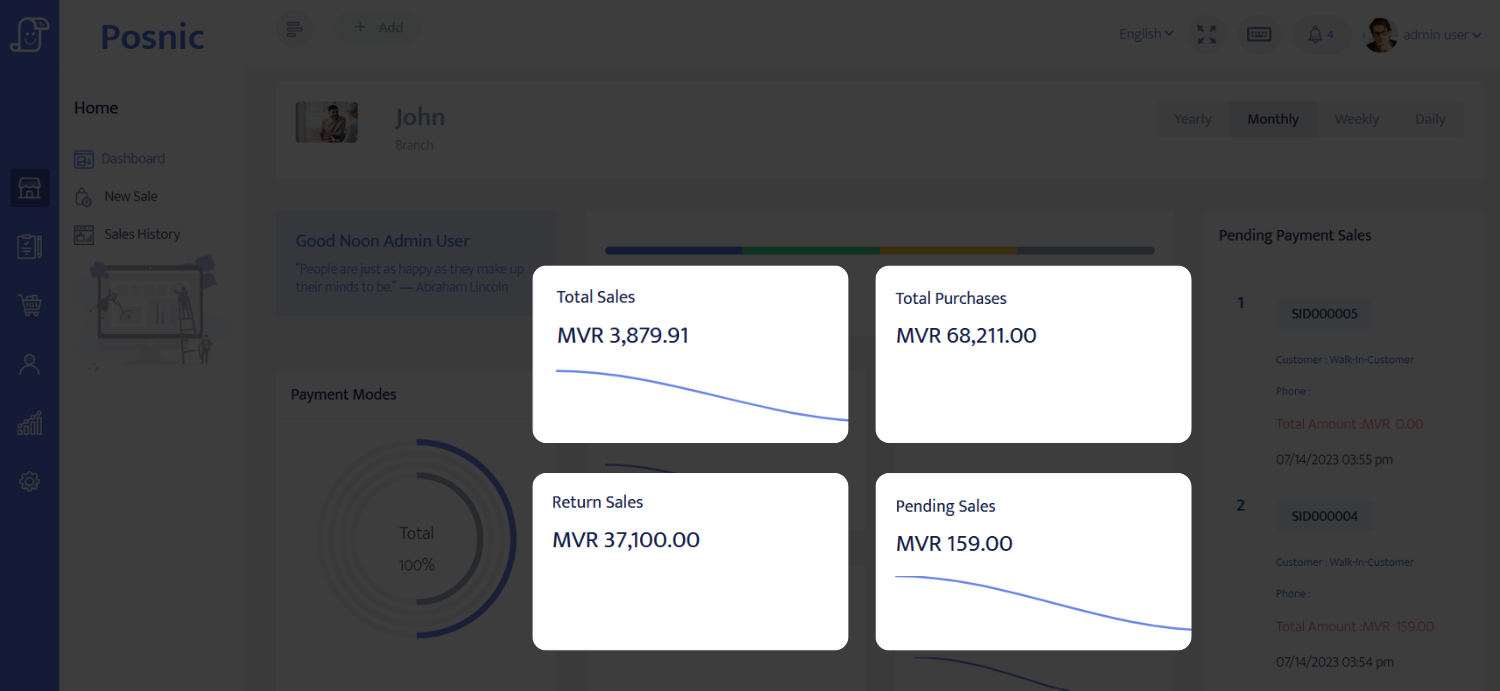
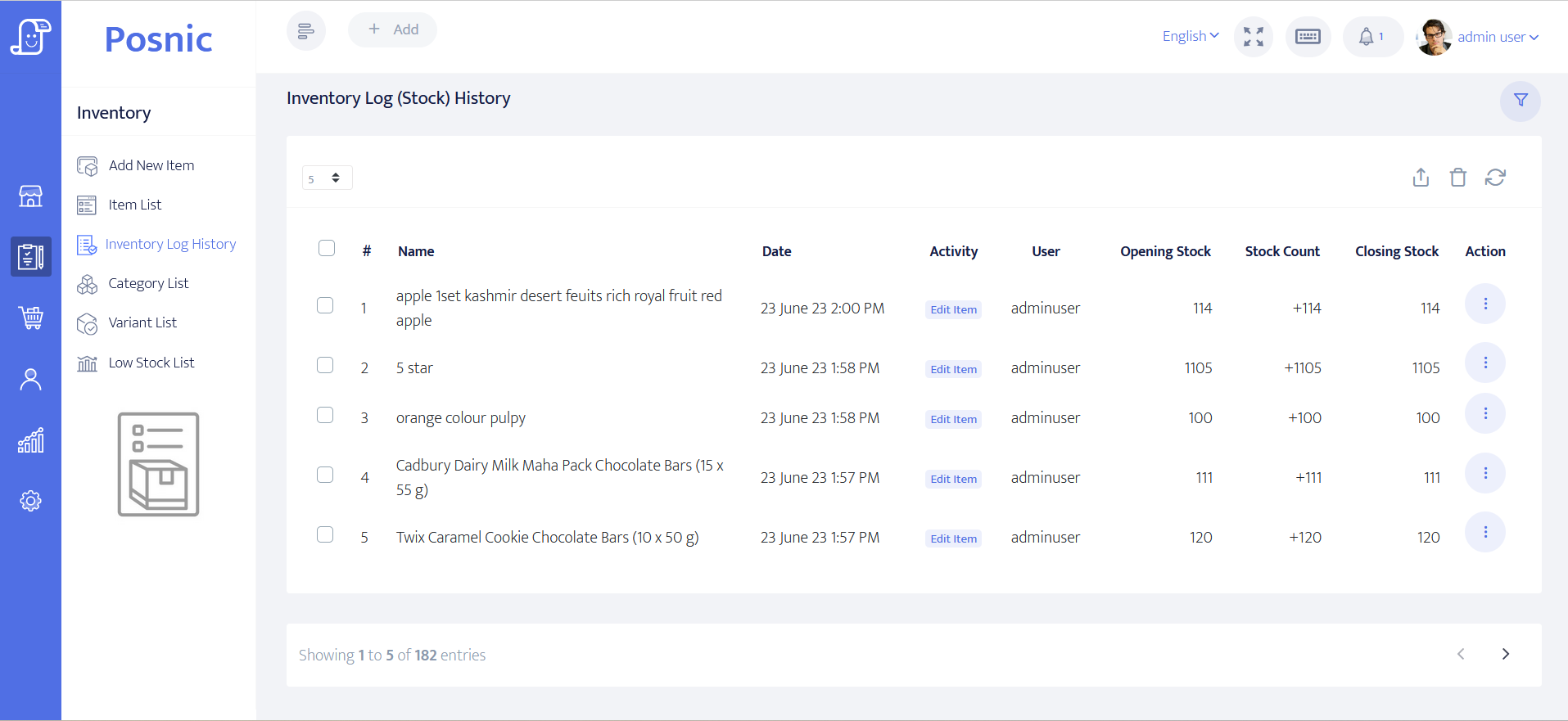
The checkout screen is shown above. These supporting screens show the owner view behind daily billing.
POS meaning: system, software and terminal
The phrase describes both the moment of checkout and the system that supports it. Separating the parts prevents a payment device, cash drawer or invoice screen from being mistaken for the whole operating system.
Acronym scope: POS has unrelated meanings in other fields, but this guide uses POS only for point of sale: the checkout event, software and operating system used to complete and record a business transaction.
POS system vs POS software
POS software is the application layer that builds the basket, applies configured price and tax rules, records the sale and can update stock, customer and report records. A POS system is the complete operating arrangement: software, checkout computer, connected devices, payment path, network and data dependencies, staff procedures, support, backup and recovery.
Strong software can still produce a weak counter if the planned printer, scanner, payment terminal, outage procedure or restore path has not been accepted. Compare the exact release first, then test the complete arrangement with the people and equipment that will use it.
Review observed software evidence · Compare POS terms · Match exact hardware · Model total cost · Use the small-business buyer guide
Demand boundary: a 25 August public suggestion capture showed qualified meaning, software, feature, price, retail, restaurant, small-business and regional questions. The bare pos seed instead completed to unrelated post-office, Postman and PostgreSQL terms in this one capture. Suggestions vary and are not search volume, rank, landing-page or conversion evidence.
| Term | Plain-English meaning | What it does not prove | Primary reference |
|---|---|---|---|
| Point of sale | The retail checkout place or transaction point where goods or services are sold and paid for. | POS has unrelated meanings outside commerce; this guide uses the acronym only for point of sale. | Cambridge Business English |
| Point-of-sale system | The hardware and software a merchant uses to accept customer payments and support the checkout workflow. | A business acceptance test must also cover records, people, procedures, reconciliation and recovery. | PCI SSC glossary |
| POS software | The application layer that builds and records sales workflows and can coordinate inventory, customer, order and report records. | A listed capability does not prove that one edition, deployment or device supports the buyer's exact workflow. | Microsoft POS architecture |
| POS hardware and peripherals | The checkout computer and connected devices such as payment readers, printers, cash drawers and scanners. | A supported device category does not certify every model, cable, driver, operating system or fallback. | Microsoft POS architecture |
| Payment terminal | A physical device that captures payment-card data so an electronic transaction can be processed. | A card reader is not the whole POS system; the terminal and its data path remain within the applicable payment-security scope. | PCI SSC terminal FAQ |
| Point-of-interaction (POI) device | A payment-acceptance product combining hardware and software at the point where card data is first read. | POI describes the payment interaction; it does not by itself describe stock, receipt, return or reporting workflows. | PCI SSC glossary |
| Cloud POS | A hosted rendering of a POS application that depends on defined remote services for business functions or data paths. | Cloud does not automatically prove uninterrupted operation, exportability, recovery or support coverage. | Microsoft POS architecture |
| Offline POS | A configured POS mode that uses a local or offline data path when an upstream service is unavailable and later reconciles or synchronizes records. | Offline capability is workflow-specific; buyers must test which operations continue and how delayed records reconcile. | Microsoft POS offline guidance |
| Barcode at retail POS | A machine-readable data carrier used at retail checkout to identify a trade item and support price lookup or related controls. | A barcode alone does not contain every product record or prove scanner, data-quality and application compatibility. | GS1 retail POS guideline |
Terminology record: download the dated nine-term CSV for the working definition, evaluation boundary, source owner and primary-source URL behind each term. It contains no product ranking or performance score.
POS system specifications to write before comparing products
A useful specification says what the complete counter must do, the conditions it must survive and the evidence required for acceptance. A processor speed or feature list alone cannot describe a working POS system.
| Specification area | Write down before selection | Evidence before approval |
|---|---|---|
| Checkout workflow | Sale, discount, tax, tender, receipt, hold, correction, void, return, credit and day-close rules. | Representative normal and exception transactions completed by the intended cashier and manager roles. |
| Items, stock and records | Required identifiers, units, variants, barcodes, weighed goods, receiving, adjustments, movement history, reports, exports and retention. | Reconciled sample records that can be opened independently and traced from source event to report. |
| Computer and platform | Exact operating system and architecture, processor, memory, free storage, display, update policy and replacement-device plan. | Installation, normal load, restart, update and clean-device recovery on the planned specification. |
| POS peripherals | Exact printer, scanner, drawer, scale and display models; interface, protocol, driver, firmware, paper, cable and fallback. | Observed output, reconnect, restart, queue, failure and fallback results for each exact device. |
| Payments and network | Cash rules, processor and terminal scope, authorization and settlement path, required connectivity, outage behavior and reconciliation owner. | Approved, declined, reversed and refunded cases matched between the POS record, terminal and processor settlement. |
| Access, backup and recovery | Roles, sensitive-data boundary, update owner, backup location, retention, encryption, restore target, recovery time and incident steps. | Permission checks plus an off-machine backup restored into a disposable or replacement setup. |
| Service, exit and total cost | Implementation, migration, training, support hours, escalation, hardware replacement, data export, cancellation and every recurring or usage charge. | Named owners, dated terms, a tested complete export and a cost model that keeps quoted, estimated and unknown amounts separate. |
What public POS buyers asked vendors to prove
Posnic manually coded nine public procurement documents and three public notice or opportunity records, dated 2016 to 2026, against the same twelve buyer controls. The sample covers Australia, Canada, New Zealand, South Africa, the United Kingdom and the United States. Across the resulting 144 source-category checks, 114 contained at least one explicit requirement in the reviewed scope.
Counter workflow appeared in all twelve records. Payment scope, hardware fit, data or integration terms and operating cost each appeared in eleven. Backup and clean restore appeared in only five of twelve, which is a reason to ask for it explicitly rather than evidence that it is optional.
This bounded English-language sample is not a market-frequency study, legal template or product score. NSW, Wellington and Telford are coded only from their public pages because full tender files were not reviewed. An observed category does not mean every question was covered or any vendor passed.
Review the method and all twelve controls · Inspect the 144-check source matrix
Write POS requirements before demos or quotes
Start with workflows: sale, return, payment, stock, reports, roles, offline behavior, backup and exit. Each requirement needs expected evidence, owner and stop-or-go decision before a vendor demo or paid scope.
Use the blank brief to separate must-pass requirements from nice-to-have features, then take only the accepted requirements into the selection guide, demo script, quote and rollout plan.
Download the POS requirements brief Open the dated intent note
Use it as a buyer record: the worksheet is blank until the business adds its own evidence, specialist review and decision. It does not certify Posnic or any other POS product.
Turn each specification into a pass condition
Record the expected result, exact configuration, observed result, retained evidence, owner and stop-or-go decision. Keep product-specific computer and peripheral claims separate from the requirements every candidate must meet.
Use the complete 12-point POS selection method to compare every shortlisted system with the same gates, weights and retained evidence.
Put written quotes on the same period with the vendor-neutral POS total-cost calculator; it keeps software, hardware, setup, operations, payment processing and exit costs separate.
Switching from an old POS? Freeze export, trial import, stock totals, payment settlement, rollback and first-day close evidence with the POS migration cutover record before the quote or go-live window.
Before ordering POS hardware, keep exact device identity, driver, firmware, cable, manufacturer baseline, receipt, scanner, cash drawer, scale, payment-terminal review, failure recovery, supplier terms and owner approval with the POS hardware acceptance record.
Before accepting POS implementation work, keep scope, source data backup, import mapping, tax and receipt review, devices, payments, staff tasks, pilot evidence, support escalation, rollback and restore proof with the POS implementation acceptance record.
Close to launch? Keep cashier roles, denied actions, training shifts, payment exceptions, device fallback, day close and first-live-sale ownership visible with the POS staff go-live readiness record.
Before accepting a POS day close, match cash, card results, refunds, duplicate retries, stock movement, close totals, outage notes and restore evidence with the POS transaction reconciliation record.
Download the 12-point scorecard Check Posnic hardware requirements
Compare observed behavior, not only checkboxes: run the same ten-scenario synthetic POS acceptance fixture in each candidate, then retain its sale, return, decline, void, duplicate-control, stock and close evidence.
How a POS system works
A useful POS creates an explainable record from item selection through payment, stock movement and closing. The exact sequence varies, but a buyer should be able to reproduce these six stages.
Vendor-neutral responsibility map
From checkout input to reconciled business records
The solid path is the POS transaction. Devices, payment services and optional remote services cross separate responsibility boundaries and need separate failure tests.
-
Capture
Identify the basket
Item or service, quantity, operator, customer when required, and the rule set that applies.
Input can come from selection, barcode, scale or another accepted device path. -
Decide and commit
Create the POS sale record
Resolve price, discount, tax and rounding; record the tender result; then commit once under the system's completion rule.
A payment authorization is not automatically the same record as the POS sale. -
Explain
Produce linked evidence
Receipt or invoice, stock movement, return trail, reports, close totals and a recoverable record where the setup supports them.
Each output needs an identifier that staff can trace back to the source transaction.
Counter devices
Scanner, scale, printer, drawer and display paths depend on the exact model, interface, driver and fallback. Source support is not physical acceptance.
Electronic payment
The terminal and processor own authorization and settlement records. Match their approved, declined, reversed and refunded outcomes to the POS sale.
Optional remote service
Sync, off-site backup and remote reporting may require a network. Define queue, retry, conflict, duplicate and recovery behavior before rollout.
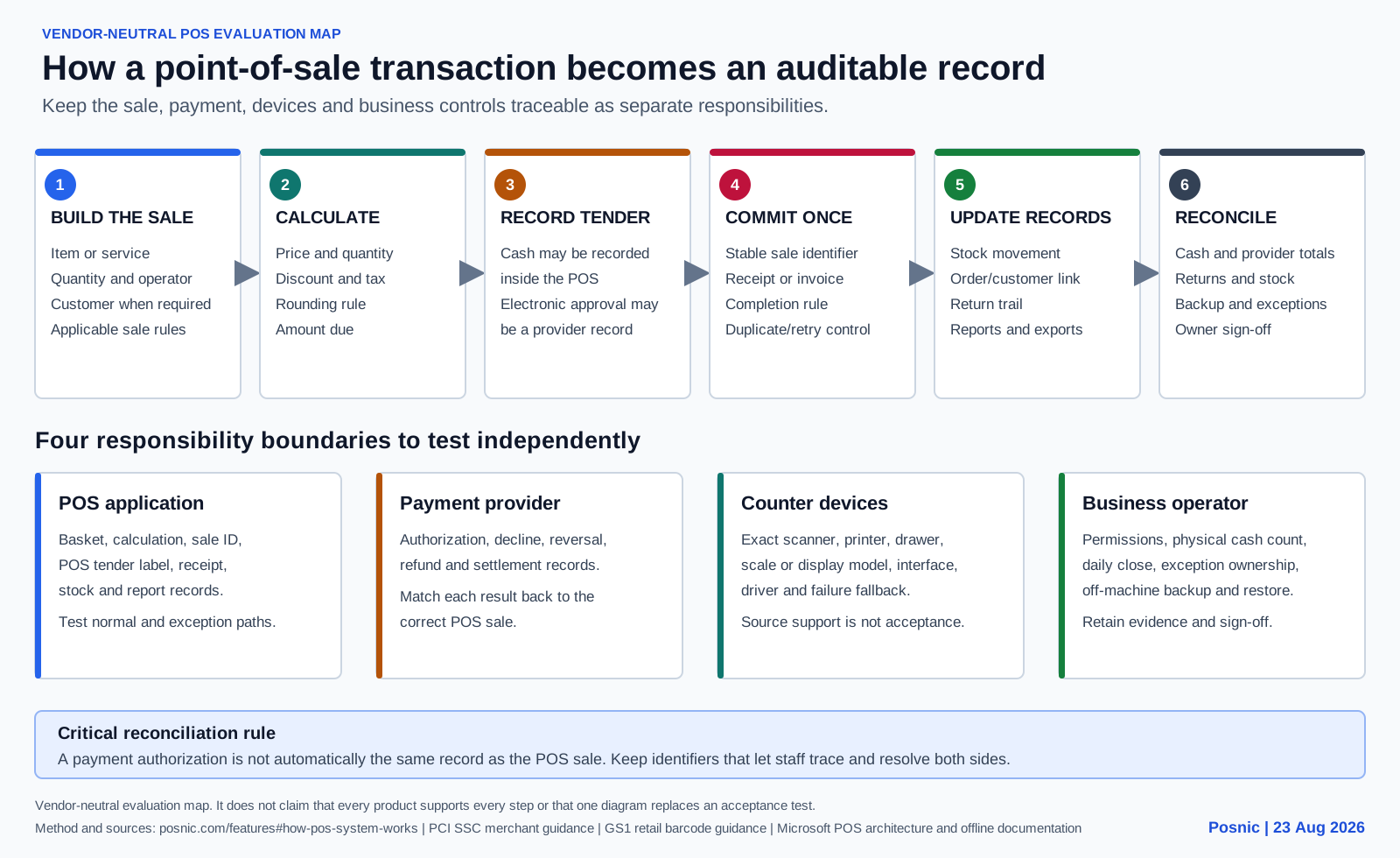
- Build the sale. The cashier scans or selects an item or service. The system resolves its identity, quantity and current selling rule.
- Calculate the amount. The POS applies configured prices, discounts, taxes and rounding, then shows the amount due before payment.
- Record the tender. Cash can be recorded in the POS. An electronic payment may be authorized by a separate terminal and processor, then linked back to the sale.
- Commit the transaction. The system saves the sale according to its completion rules and issues the required receipt or invoice record.
- Update connected records. Depending on the setup, the sale can create stock movement, customer, order, tax and report records. These updates must be tested rather than assumed.
- Reconcile and recover. Staff compare POS totals with cash, terminal settlements, returns and selected stock, then preserve a restorable backup and an exception trail.
Payment is one part of the transaction
The POS basket and the payment authorization are related records, not automatically the same record. Test approved, declined, cancelled, reversed and refunded electronic payments, then reconcile the processor settlement independently. Use the PCI Security Standards Council merchant resources to identify payment-data responsibilities for the actual setup.
Architecture is not universal. Microsoft's current documented POS topology separates client, business-function and peripheral layers, while its offline documentation treats the local database and later synchronization as explicit deployment behavior. These sources support the evaluation method; they do not establish Posnic behavior or make every POS architecture equivalent.
Benefits of a POS system, and how to verify them
A POS system can make checkout and business records more dependable, but the benefit comes from an accepted workflow, not from the product label. Set a measurable pass condition before treating any outcome as proven.
| Potential benefit | Required system behavior | Acceptance evidence |
|---|---|---|
| Faster checkout | Items, prices, discounts, taxes, tender and receipt steps remain usable during representative normal and rush transactions. | Timed test baskets, correction counts, queue observations and cashier sign-off on the exact counter setup. |
| More reliable sale records | The basket, amount, tender, receipt, return and correction records can be traced to the same transaction without unexplained gaps. | Sample transactions reconciled from source action to stored sale, receipt, payment record and report. |
| More explainable inventory | Receiving, sale, return, waste and adjustment events create dated stock movements with responsible users. | An opening count plus representative movements reconciled to the closing system balance and physical count. |
| Stronger cashier control | Individual roles restrict price, discount, void, refund, tax and close actions, while approved exceptions retain an audit trail. | Denied-action tests, approved exception records and a reviewed permission matrix for cashier and manager roles. |
| Quicker day close | Sales, returns, discounts and tender totals remain separately visible and can be compared with cash and processor records. | A mock closing that matches POS totals, counted cash, terminal settlement and unresolved variance records. |
| Better recovery from failure | The business knows which tasks continue during each outage and can restore required data and configuration from a separate copy. | Controlled network and device drills plus a timed clean restore whose records are checked after recovery. |
POS system, cash register and card terminal compared
| Tool | Primary job | Records commonly expected | Question before buying |
|---|---|---|---|
| Cash register | Total a sale and hold cash. | Basic transaction or till totals, depending on the model. | Does the business also need item-level stock, returns, permissions and searchable history? |
| Card terminal or reader | Capture and authorize electronic payment. | Authorization, reversal, refund and settlement records from the processor. | How will terminal results link to the POS sale and reconcile when either side fails? |
| Billing or invoicing software | Create a bill, invoice or receivable record. | Invoice, tax, customer and payment-status records, depending on scope. | Does it support the live checkout, stock movement, returns and hardware the counter needs? |
| POS software | Run the checkout and retain the sale workflow. | Basket, price, tax, tender, receipt, return, stock and report records, depending on configuration. | Which functions were observed end to end on the exact release and equipment? |
| Complete POS system | Join software, devices, payment paths, people and operating procedures. | Transaction evidence plus separate payment, cash, stock, backup and exception records. | Can staff complete, reconcile and recover a representative business day? |
Types of POS systems
Deployment labels describe where the application and records depend on running. They are starting points for testing, not guarantees of availability, ownership or security.
Local or on-premise POS
The shop computer or a local server runs the primary application and stores operational records. This can reduce dependence on a hosted service during selected workflows, while making local backup, updates, device recovery and physical security explicit owner duties.
Cloud POS
A provider-hosted service supplies the application or primary data path. It can simplify remote access and centralized updates, while connectivity, account access, export, provider recovery and service terms remain dependencies to verify.
Hybrid or offline-capable POS
Local work continues for defined tasks and synchronizes with a hosted service later. Test exactly which tasks continue, how conflicts are resolved, what users see during an outage and how delayed records reconcile.
Mobile POS
A phone, tablet or handheld device runs the checkout. Portability can suit tableside, queue-busting, market or delivery work, but battery life, connectivity, payment support, permissions and receipt options still need an on-device test.
Self-service kiosk POS
A customer-facing screen lets the buyer build or pay for an order. Accessibility, product availability, payment recovery, staff intervention, receipt output and downstream fulfilment are part of the system.
Multichannel POS
Store, mobile or online orders share selected product, customer, stock or payment records. Define the owner of each record and test duplicates, returns, delayed events and channel conflicts before calling the data unified.
POS system examples by business workflow
A useful example follows the transaction into the records the business must reconcile. The same POS label can describe very different counter, device and recovery responsibilities.
| Business example | Typical checkout flow | Records to reconcile | Failure to test |
|---|---|---|---|
| Retail shop | Scan or select an item, confirm price and tax, record cash or electronic tender, issue a receipt and reduce stock. | Sale, tender, receipt, item movement, return trail and day-close totals. | Unknown barcode, wrong price, declined payment, printer failure, duplicate retry and return after close. |
| Restaurant or cafe | Open a table, takeaway or counter order; record quantities and modifiers; send kitchen work; settle the bill and close the service. | Order changes, kitchen ticket, completed sale, tender, receipt, void or return, and shift totals. | Kitchen printer outage, item unavailable after ordering, moved table, split tender, cancelled item and delayed payment result. |
| Service or repair counter | Identify the customer and job, record services and parts, take a deposit or final payment, and issue the agreed billing record. | Job reference, scope changes, parts movement, invoice, deposit, balance, payment and completion evidence. | Changed scope, partial payment, cancelled job, returned part, disputed completion and data export for follow-up. |
| Mobile or pop-up seller | Use a phone, tablet or handheld checkout to select goods, accept an available tender and provide a receipt away from a fixed counter. | Device sale, payment-provider result, receipt, stock change, later synchronization and close totals. | Weak network, flat battery, lost device, delayed sync, duplicate submission, no printer and offline electronic payment. |
| Multi-location business | Use a branch-specific register with shared or synchronized catalog, price, customer and stock records, then close each location separately. | Branch sale, tender, stock movement, transfer, user action, sync event and local plus consolidated reports. | Stale price, branch-access error, conflicting stock, delayed event, duplicate replay, failed transfer and one branch losing connectivity. |
An example is not a product claim
These workflows explain the category. They do not establish that Posnic or any other product completes every step. Compare each candidate against the same required result, exact devices and retained evidence.
Use the 12-point POS selection method to turn the relevant example into mandatory gates, then run a representative acceptance day before rollout.
Evidence and review scope
Evidence reviewed 22 August 2026. The review uses stable release v1.9.0, pinned stable source commit archived source snapshot, reproduced local runtime evidence, a 21-check inventory lifecycle record, a 49-check opening-to-close counter-session record, and a separate post-release source import record pinned to commit 5803f200636c777eef77e2e5e1fe31fb86b38fd5.
The counter session was a compressed synthetic API run, not a packaged-interface or clock-length staff shift. The catalog-import run used the shared parser, real item repository and isolated MongoDB, but bypassed browser FileReader, rendered UI, HTTP, authentication and the packaged desktop; that correction is not in the archived evidence run download. No complete retail, restaurant or kiosk operating day, physical POS hardware, card terminal, physical cash count, production database, disk-loss event, macOS run, Linux run, independent security audit or hosted-cloud acceptance test was included.
Evidence at a glance
These results are intentionally labelled by evidence type. A passing source test is not presented as a completed shop rollout.
| Area | Observed evidence | Boundary |
|---|---|---|
| Local sale | One synthetic INR 125 cash sale completed and reopened on Windows x64 while external hosts were blocked inside Electron. | Not an operating-system-wide network disconnection, power-loss test, payment-terminal run or full shift. |
| Inventory lifecycle | Twenty-one API checks passed: stock moved from 100 to 120 after receiving, to 118 after a two-unit sale, and to 119 after a one-unit return. Duplicate sale and refund replays made no second stock change; the report reconciled to INR 138 net sales. | Synthetic endpoint-level run; no packaged interface, physical hardware, external payment network, customer production data or complete trading day. |
| Counter session | Forty-nine API checks passed: one register opened and closed; 12 sales covered 20 units; one return restored stock; duplicate sale and refund replays made no second change; and stored and graphical-report net sales both reconciled to INR 2,622. | Compressed synthetic API session. Cash, UPI and Card were labels only; no packaged interface, physical cash, terminal, customer data or clock-length trading day. |
| Backup and restore | A synthetic backup restored 20 collections and 53 documents with matching source and destination totals. | Disposable test data, not a production database, damaged disk or full disaster-recovery exercise. |
| Receipts and reports | 37 focused receipt and report, local-asset and sales call-path source tests passed. | No physical receipt, packaged-interface shift or clock-length staff acceptance day was run. |
| Retail and supermarket support | 57 vertical-supporting source tests passed across item, weighed-quantity, receipt, report and related paths. | No complete retail or supermarket day and no physical retail hardware. |
| Kiosk support | 24 focused kiosk source tests passed for settings, availability, guarded routes, order paths and reports. | No physical kiosk order, payment, kitchen print or report was executed. |
| Hardware paths | 35 hardware protocol and source tests passed for receipt, report and weighing-scale paths. | No physical printer, scanner, drawer, scale, display or payment terminal was connected. |
| CSV templates and catalog import | Six stable-source tests checked all seven shipped CSV templates. In a separate post-release source run, generated 100, 1,000 and 10,000-row files were parsed, persisted and reconciled to 100, 1,000 and 10,000 distinct items. | The scale run is source-only evidence pinned to commit 5803f200636c777eef77e2e5e1fe31fb86b38fd5. It bypassed browser FileReader, rendered UI, HTTP, authentication and the packaged desktop, and is not a archived evidence run download result. |
| Local API | A curated API Jest run reported 7,953 passed tests and zero failures. | Curated suite only; conflicting endpoint totals remain in three documents and no stable public plugin or sync contract is claimed. |
Watch a sale from basket to bill
This short first-party tutorial shows the checkout flow. Reproduce it on the current release with your own item, tax, user and hardware setup.
POS feature map
Treat each group as a workflow to verify, rather than a checkbox that guarantees a business outcome.
Sales and billing
Product documentation covers sales, returns, customers, taxes and reporting. Validate prices, discounts, tax, payment, permissions, correction records and receipt output with representative transactions.
Stock and purchasing
A synthetic API run received stock, saved and replay-protected a sale, processed and replay-protected a return, retained three movement records and reconciled the report. Accurate live stock still depends on units, receiving, wastage, adjustments and physical counts.
Restaurant operations
archived evidence run documents KOT and Easy Table workflows, and the source contains six KOT report views. Table service, kitchen routing, modifiers and close-out were not run end to end.
Kiosk workflow
The source includes kiosk settings, item availability, guarded routes, order-processing paths and reports. Accessibility, enclosure, payment, kitchen output and staff recovery need an on-device acceptance test.
Local backup
Configurable backups are documented and a synthetic restore passed. The default same-disk location does not protect against disk loss, so copy backups off the till and rehearse recovery.
POS hardware
The hardware matrix covers receipt-printer, scanner, drawer, scale and display paths by support level. Match the exact model, interface, operating system, driver, paper width and fallback before purchase.
Data import
Seven stable-source CSV templates passed structural checks. A separate source run parsed, persisted and reconciled generated 100, 1,000 and 10,000-row catalogs through the shared parser, item repository and isolated MongoDB. It did not exercise the packaged archived evidence run interface, so trial a reversible import with representative duplicates, tax groups, units and malformed rows before loading a live catalog.
Local API and source
The desktop process starts a local API and database on derived port ranges. Review the pinned source and API limitations before building an integration or depending on undocumented behavior.
Optional cloud services
Cloud is a separate paid service described for sync, off-site backup and remote dashboards. Confirm current availability, data flow, conflict handling, recovery, support and commercial terms before rollout.
Local privacy model
The local edition documentation says it needs no Posnic account and sends no analytics or telemetry to Posnic. Optional services and business-selected integrations change the data-flow review.
Source and package licences
Posnic's own public source is AGPL-3.0-only. The archived packages also bundle MongoDB Community Server 7.0.14 under SSPL-1.0, which MongoDB states is not OSI-approved. Inspect the package evidence and review each component before distribution or deployment.
Published installers
The stable release publishes Windows x64, macOS Intel and Apple Silicon, and Linux x86_64/amd64 builds. This review reproduced runtime behavior on Windows x64 only.
Start simple, then switch on what the shop uses
A good POS does not make every cashier learn every module on day one. Set up the counter around the workflows that matter now, then add cloud, customer, restaurant, kiosk or integration work only when the business has a reason to use it.
Keep billing local first
The desktop app runs the primary API and database on the shop computer. That keeps the daily counter separate from optional cloud features and lets the owner test offline behavior before rollout.
Control stock and prices
Items, variants, categories, purchases, stock logs, low-stock review and price-list workflows should be enabled around the exact products the shop sells, not around a generic demo catalog.
Use customers when it helps selling
Customer accounts, categories, balances, credit settings, loyalty routes and customer reports support repeat-business workflows. Consent, local rules and message costs still belong in the business plan.
Match the service model
Retail, supermarket, restaurant table, KOT, kiosk and customer-display paths should be tested as different operating modes. A restaurant setup needs table, kitchen, modifier and split-payment evidence; a retail setup may not.
Make the screen feel familiar
Theme-aware secondary windows and shop presentation settings help staff recognize their own working environment. Visual comfort is useful, but it should never hide price, tax, stock or permission evidence.
Add cloud for owner control
Optional Cloud is the paid path for sync, off-site backups and remote dashboards. Evaluate it by queue, conflict, recovery and export behavior instead of assuming every online POS behaves the same.
Roadmap features need user demand and evidence
Chatbot help, AI-assisted voice sales, QR table ordering, ecommerce storefronts, e-invoice, auto tax submission and platform integrations are planned areas. The right next step is to collect the exact business workflow, country, tax/payment dependency and urgency, then publish evidence only when the feature can be tested.
Read the Posnic roadmap · Post a feature idea · Try the live demo
Dependencies to test outside the feature list
| Workflow | Current evidence level | Outside dependency | Buyer test |
|---|---|---|---|
| Local cash sale | Limited Windows runtime result plus source tests | Computer, power, staff permissions, item and tax setup | Run normal and exception sales, then reconcile the saved records. |
| Receive, sell and return stock | One 21-check synthetic API lifecycle with duplicate-write guards and report reconciliation | Catalog quality, units, supplier records, staff procedure, damaged stock, adjustments and physical counts | Repeat the lifecycle with representative goods, users and exception paths, then reconcile movement history to a physical count. |
| Open, operate and close a counter | One 49-check compressed API session with 12 sales, one return, register close and record reconciliation | Staff procedure, physical cash and denominations, exact devices, payment providers, shifts, outages and management sign-off | Run a clock-length acceptance day in the packaged application, count the drawer, match provider totals and retain independent sign-off. |
| Electronic payment | No physical terminal run in this review | Processor, terminal, network, settlement and refund process | Match approved, declined, reversed and refunded payments to POS records. |
| Receipt and drawer | Focused source and protocol tests | Exact printer, driver, interface, paper width and drawer wiring | Print representative long receipts and test the failure fallback. |
| Barcode and weighed item | Source tests and standards review | Barcode data, scanner mode, scale model, interface and calibration | Test good, duplicate, unknown and damaged labels plus weighed quantities. |
| Restaurant or kiosk | Documentation and focused source tests | Screen, enclosure, accessibility, payment, kitchen routing and recovery | Run a complete customer order through fulfilment, correction and report. |
| Backup and recovery | One synthetic restore | Separate storage, retention, encryption, owner and replacement machine | Restore an off-machine copy into a disposable environment and verify records. |
| Optional cloud | Edition documentation only in this review | Hosted service, connectivity, account, support and commercial terms | Complete a written acceptance test for sync, conflict, outage, export and recovery. |
What this evidence does not prove
- It does not prove compatibility with a buyer's physical printer, scanner, drawer, scale, display or payment terminal.
- It does not prove a clock-length retail, restaurant, supermarket or kiosk day under production load; the recorded counter session was compressed synthetic API evidence.
- It does not reproduce runtime behavior on macOS or Linux, even though stable installers are published for those platforms.
- It does not establish country-specific tax certification, payment certification or legal compliance.
- It does not replace an independent security audit, penetration test or business-specific threat review.
- It does not establish hosted-cloud availability, branch-sync acceptance, an integration SLA or a stable public sync/plugin contract.
- It does not prove stock will be accurate without disciplined receiving, units, returns, wastage, adjustments and physical counts.
- It does not prove the archived packaged import can load 10,000 items; the recorded scale result is from post-release source and bypassed browser FileReader, UI, HTTP and authentication.
Ten tasks before a POS go-live
- Write the required sale, return, purchase, stock, tax, payment, permission and day-close workflows before configuring software.
- Create representative items including variants, discounts, tax groups, weighed goods, duplicate barcodes and awkward quantities.
- Use the exact computer, operating system, printer, scanner, drawer, scale, display, payment setup and network planned for the counter.
- Run cash and electronic sales, holds, discounts, returns, cancellations and credit paths with the intended cashier and manager roles.
- Receive a purchase, sell and return stock, record an adjustment, then explain each quantity from the movement history and a physical count.
- Test every required receipt, report, export and tax field against the business's accounting and record-retention process.
- Disconnect each external dependency separately and document what continues, what stops, how staff are warned and how transactions recover.
- Close a mock day and reconcile sales, returns, discounts, cash, processor totals, open credit and selected stock independently.
- Copy a backup off the till, restore it on a disposable setup and verify representative items, sales, stock and reports.
- Record rollout ownership, support contacts, update windows, incident steps, replacement-device setup, export procedure and rollback criteria.
Keep a 20-record POS acceptance log
Record the exact release, configuration, expected result, observed result, retained evidence, owner, specialist review and stop-or-go decision for each critical workflow. The blank log separates an advertised feature from a feature your business has actually accepted.
A blank row is not a pass. Keep screenshots, receipts, exports, provider records and restore evidence outside the till, then link or identify them in the log.
Primary sources, independent review and citation
POS meaning and system terms
Separate the commerce acronym, payment terminal and complete checkout system before comparing products or requirements.
Stable source and user guide
Inspect the exact source snapshot and documented workflows used by this review.
Hardware evidence matrix
Review support levels, exclusions and buyer-test requirements for POS devices.
PCI merchant resources
Use primary payment-security guidance to map terminal, processor, vendor and card-data responsibilities.
GS1 retail barcode standards
Use the standards owner for EAN/UPC identity, symbol and scanning guidance rather than assuming every code or scanner behaves alike.
NIST CSF 2.0 for small business
Use current primary guidance to assign governance, protection, detection, response and recovery responsibilities.
Reproducible product evidence
See the release, source commits, runtime boundaries, test files and evidence-maintenance method in buyer-readable and machine-readable records.
Verify Posnic specifications · Read the counter-session evidence · Read the source-import evidence
Independent review and citation kit
Posnic currently has no unaffiliated hands-on review. Review access does not require payment, positive coverage, a backlink or advance approval. Keep the exact version, environment, failed steps and limitations with any published result.
Download the review brief · Run the review protocol · Inspect CodeMeta · Cite the software · Cite the research catalog · Report a correction
Questions buyers ask
What does POS stand for?
POS stands for point of sale: the time and place where a customer completes a purchase. A POS system is the connected software, checkout device and optional hardware used to calculate, record and complete that transaction.
What is a POS system?
A point-of-sale system records a sale and coordinates the checkout workflow. Depending on the setup, it can calculate prices, discounts and taxes; record cash or electronic tender; issue a receipt; update stock; and retain records for returns, reconciliation and reporting.
What is the difference between POS software and a POS system?
POS software is the application that builds and records the checkout workflow. A POS system is the complete arrangement around it: the software, computer, peripherals, payment path, network and data dependencies, people, procedures, support, backup and recovery. Test both the exact software release and the complete counter.
What features should POS software include?
Start with the workflows the business must reconcile: item selection, price and tax, tender records, receipts, corrections, returns, stock movement, roles, reports, export and recovery. A feature name is not acceptance evidence; run normal, failure and recovery cases on the exact release and configuration.
Is a card terminal the same as a POS system?
No. A card terminal or payment processor handles electronic-payment authorization and movement. POS software records the basket, prices, taxes and sale. They may be integrated, but each has separate failure, security and reconciliation responsibilities.
Does every POS system need the internet?
No single answer applies to every system. Cloud services, card authorization, downloads and remote sync may require a network, while some local or offline-capable systems can continue selected cash-sale workflows. Buyers should test each dependency separately.
How much does a POS system cost?
Total cost can include software, checkout computers, payment devices, printers, scanners, setup, data migration, processing fees, support, backups, updates and downtime. A zero software price does not make the complete operating setup cost-free.
What are common POS system examples?
Examples include a retail checkout that links a sale to stock, a restaurant counter that links an order to kitchen work, a service desk that links a job to parts and payment, a mobile checkout, and a multi-location register. Each example has different records and failure cases to test.
What should POS system specifications include?
Write the required checkout and exception workflows, data and export rules, computer and device configuration, payment and network dependencies, access controls, backup and restore targets, support ownership, exit terms and total cost. In Posnic's bounded review of twelve public procurement records, counter workflow appeared in all twelve, while payment, hardware, data or integration and total-cost controls appeared in eleven. Give every requirement an observable pass condition.
Which Posnic POS features were tested at runtime?
The review reproduced one synthetic local Windows sale, one synthetic backup-and-restore drill, and a separate 21-check API inventory lifecycle covering receiving, sale, duplicate-sale protection, partial return, duplicate-refund protection, stock logs and report reconciliation. The inventory run did not drive the packaged interface or physical hardware.
Has Posnic tested a 10,000-item catalog import?
One clean post-release source run parsed, persisted and reconciled generated 100, 1,000 and 10,000-row files through the shared CSV parser, real item repository and isolated MongoDB. It did not exercise browser FileReader, rendered UI, HTTP, authentication or the packaged desktop, and the correction is not in the archived evidence run download.
Has Posnic tested every supported POS device?
No. Thirty-five focused protocol and source tests passed, but no physical printer, scanner, drawer, scale, customer display or payment terminal was connected in this review.
What should a business test before using Posnic POS?
Run a representative sales day on the exact operating system, items, taxes, users, printer, scanner, payments and network planned for the business; reconcile cash and stock; then restore an off-machine backup before approval.
Is the free Posnic desktop application a timed trial?
No. The archived desktop packages have zero software price and no trial clock. Posnic's own source is AGPL-3.0-only; the packages also bundle MongoDB Community Server under SSPL-1.0. Optional cloud services are separate and should be evaluated against current availability and terms.