Tested POS operations guide
How to keep billing during an internet outage
An offline-capable till solves only the billing part of an outage. Your payment terminal, receipt printer, local network, power and recovery procedure each need their own test. This checklist separates those dependencies and shows exactly what archived Posnic evidence passed.
Reproduced on the published Windows build
On 17 August 2026 we downloaded the exact portable artifact from v1.9.0, matched its SHA-256 to the website release manifest, and ran it with a disposable profile.
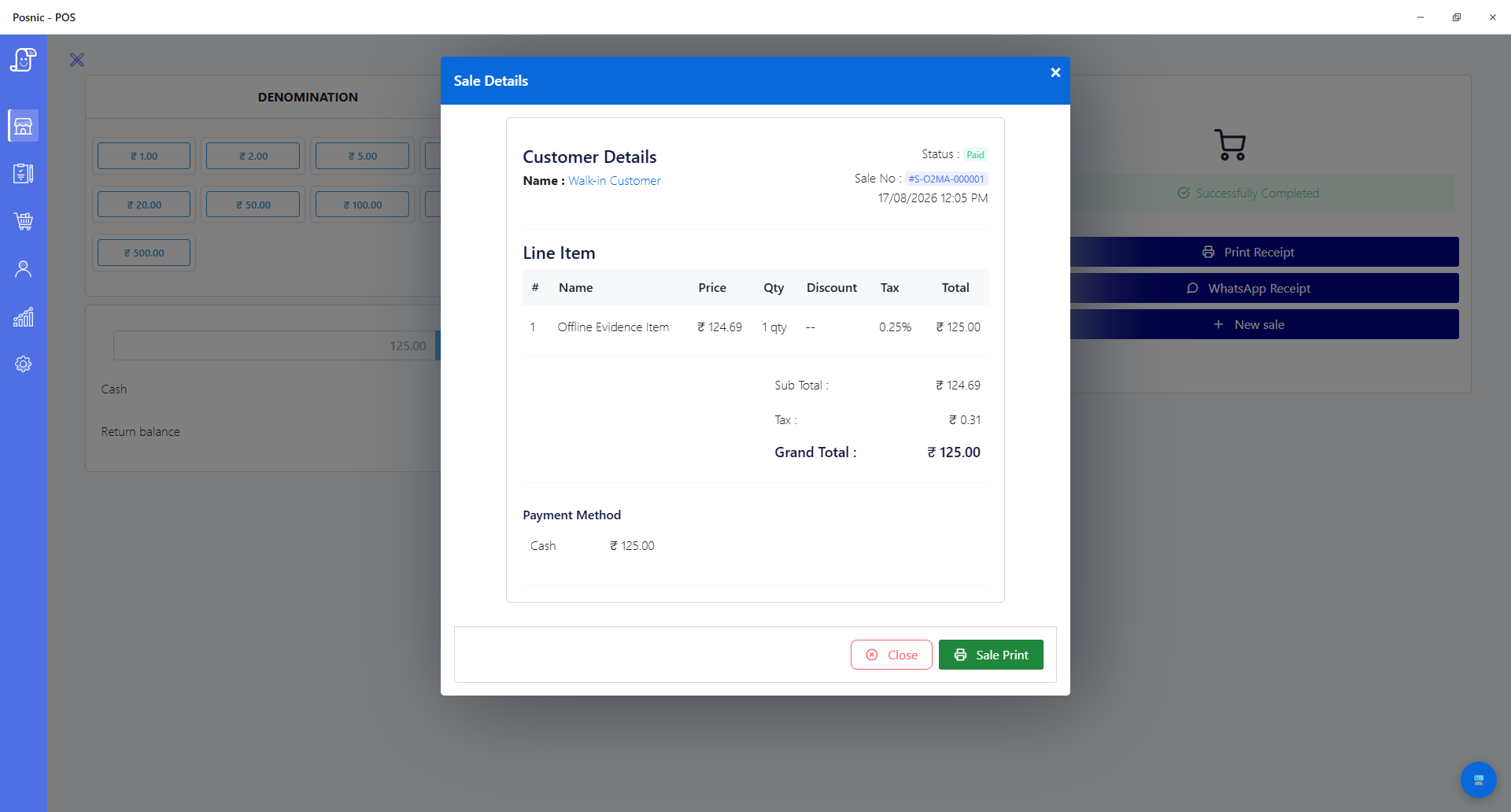
What the verifier did
- Mapped external hosts to not-found inside Electron while preserving localhost.
- Confirmed the local API answered and an external HTTPS probe failed.
- Completed local setup and login under that condition.
- Created a stocked item and completed a paid cash sale.
- Reopened the sale from storage and repeated both network probes.
| Verified | Result | Not established by this run |
|---|---|---|
| Artifact identity | 166,461,732-byte Windows portable file; SHA-256 606be5f1...8831e4b matched. | macOS and Linux runtime behavior. |
| Local sales path | Setup, login, item creation, cash sale and stored-record lookup completed. | Cloud sync, remote ordering or payment-provider availability. |
| Network condition | External-host resolution was blocked in Electron; localhost remained available. This was not an operating-system-wide network disconnect. | A cable pull, router failure or adapter disconnection. |
| Receipt path | The stored sale and print action were present. | Physical printing; no printer was connected. |
Archived evidence source: source snapshot · Offline POS product details
Map every outage dependency
Billing and stock
Confirm item search, prices, tax, customer selection, sale completion, stock movement and local reports without a remote server. Reopen the saved sale instead of trusting a success message alone.
Payments
Local billing does not make card, UPI or wallet providers offline. Ask each provider what works without connectivity, set transaction limits, and document when staff must switch to cash or pause checkout.
Receipt hardware
Use USB or a shop LAN when possible. Disconnect the internet while leaving the printer and local router powered, then print a real sale on the exact driver, cable and paper width used at the counter.
Power and local network
A UPS should cover the till, printer and local router long enough to finish or suspend a sale. Internet failure and power failure are different drills; test both.
Run a 20-minute outage drill before opening
- Create a test item, customer and payment rule; never use a live customer record for the drill.
- Block or disconnect external access while keeping the local till, database and printer network available.
- Restart the POS and sign in. A page that was already open is not enough proof.
- Complete one cash sale and one transaction using every provider-approved fallback mode.
- Print a physical receipt and verify sale number, tax, total, paper width and cutter behavior.
- Reopen the sale, inspect stock movement and run the daily report.
- Restore connectivity, review pending sync or uploads, and check for duplicate bills.
- Record the date, release version, device models, result and person who ran the drill.
Recovery needs a restore test, not a backup icon
During the same isolated archived evidence run run, Posnic created a version-2 EJSON backup of 20 collections and 53 synthetic documents with per-collection hashes and a whole-data SHA-256.
Backup
The test backup completed in 183 ms. Timing is descriptive for this tiny synthetic dataset, not a performance promise for a real shop.
Mutation
After backup, the verifier added a distinct item named Post-backup Item
, increasing the catalog from 25 to 26 items.
Restore
A drop-existing restore returned 20 collections and 53 documents. After restart, the extra item was gone while the original item and sale remained.
What staff should do
Before an outage
Know the approved payment fallback, backup location, printer procedure and escalation contact. Keep a dated drill record beside the till.
During an outage
Use only approved payment modes, keep sale numbers, avoid re-entering completed bills, and record any terminal authorization separately.
After recovery
Reconcile local bills and provider transactions, review pending sync, investigate duplicates, verify stock, and only then close the incident.
Questions
Can a POS still take card or UPI payments when the internet is down?
The POS may continue billing locally, but card terminals, UPI and other providers can still require their own connection. Define an approved cash or provider-supported fallback before an outage.
How do I test whether a POS really works offline?
Use a disposable shop, block external access, restart and sign in, create and complete a sale, reopen the record, and test the exact printer and payment hardware used at the counter.
What should staff check when internet service returns?
Confirm connection health, review pending sync or uploads, reconcile offline payments, check for duplicate bills, and verify stock and reports before declaring recovery complete.
Try the same drill on your own counter
Download the verified stable build, use test data, and test your actual printer and payment rules before relying on any POS during an outage.
Download Posnic/Check hardware evidence/Ask a rollout question