POS operations guide
Online POS system vs offline POS: choose by failure mode
Cloud, online and web-based describe where part of a POS runs. They do not tell a cashier what survives a lost connection, a provider outage, a broken till or a failed restore. Decide by testing each dependency and recovery path.
Evidence and review scope
Evidence reviewed 2026-08-18. Archived source snapshot and operations-document review, one reproduced local Windows sale, 107 focused source tests, and official NIST cloud and contingency guidance.
Stable release: v1.9.0, source commit 567a176. No hosted-cloud functional, branch-sync, load, failover, restore-time or service-level acceptance test was run in this review.
What the current evidence establishes
One local sale was reproduced
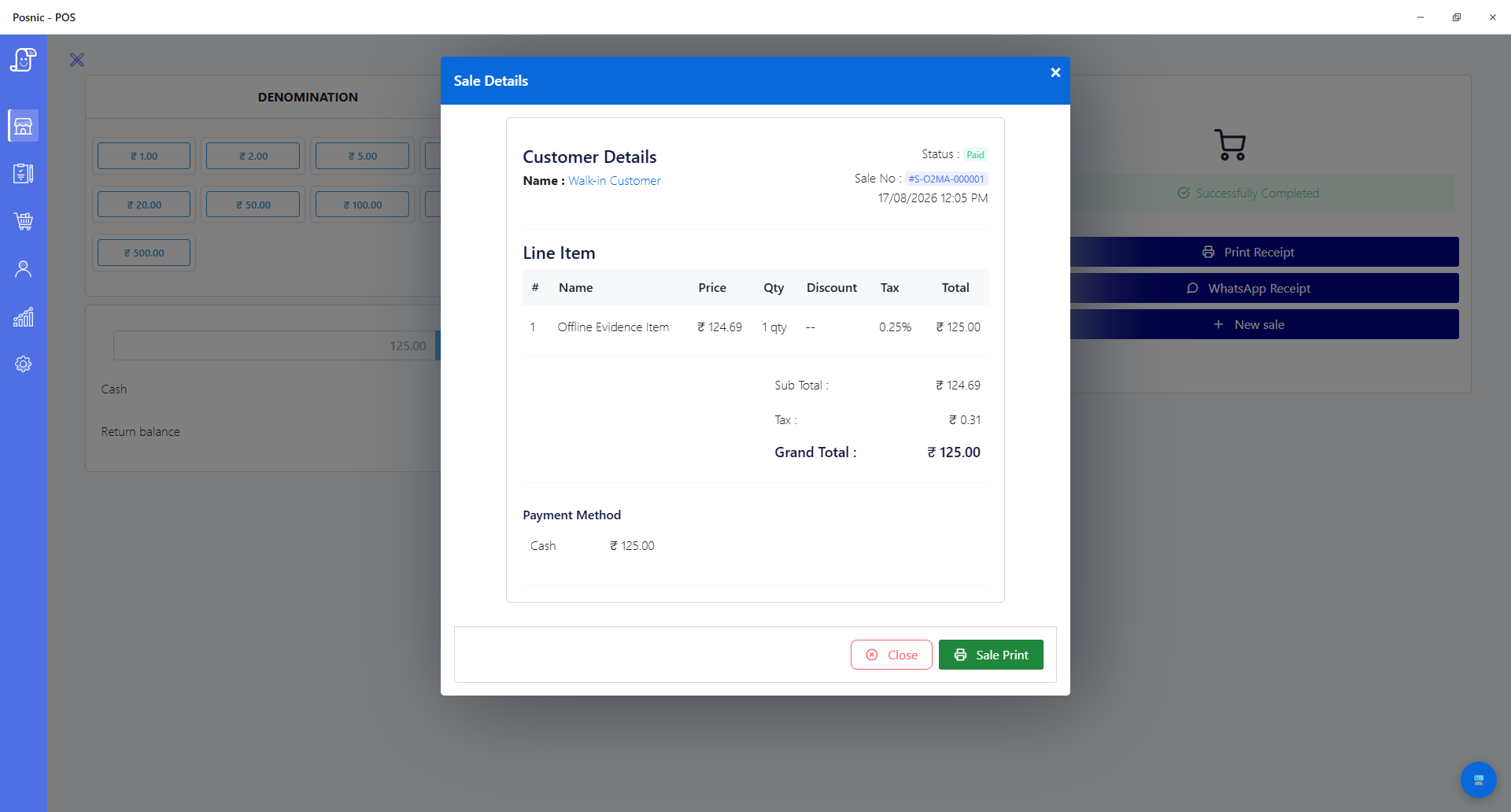
On Windows, Archived Posnic evidence stored and reopened synthetic cash sale S-O2MA-000001 while external hosts were blocked inside Electron. This is one local-runtime result, not a full-shift, power-loss or cloud-sync result.
Local-first architecture is documented
The pinned architecture places the database and API on the till and describes the sync agent as optional. It lists 19 branch-scoped or global collections in the sync contract.
68 focused API tests passed
Six API suites passed 68 tests for sync outbox behavior, database and request tenant context, branch access, field policy and tenant-scoped image storage. They exercise source boundaries, not a hosted gateway or real multi-device sync.
39 focused desktop tests passed
Four desktop suites passed 39 tests for backup path authorization, legacy tenant migration decisions, packaging lifecycle and tenant audit. They do not establish an off-site restore or hosted service recovery time.
Queued sync is documented and source-tested
The pinned operations record says the till queues changes when it cannot reach the gateway, while focused outbox tests cover source behavior. This review did not reproduce a hosted push, pull, conflict or reconnect path.
Important cloud evidence is still missing
The same operations record leaves staging, an end-to-end tenant restore, measured recovery targets, data-residency confirmation and payment-path testing incomplete before its first-paying-customer checklist is closed.
Compare operating models, not labels
These are common designs, not guarantees. A vendor may combine them differently, so require a demonstration using the exact plan, app version, branch count, devices and payment provider you will deploy.
| Decision question | Browser-first online POS | Local-only POS | Local-first with cloud sync |
|---|---|---|---|
| Sale during WAN outage | Stops unless a tested offline mode retains the complete sale flow. | Can continue if the till, local database and power are healthy. | Can continue locally if sync is not on the checkout critical path. |
| Provider outage | Core work may stop or become limited. | Core local work is unaffected by the provider because there is none. | Local work can continue; sync and remote views may be delayed. |
| Till or disk failure | Another device may sign in quickly if the service is healthy and data is current. | Recovery depends on a usable off-device backup and a tested restore. | A replacement may restore from cloud, but only if completeness and recovery have been accepted. |
| Remote owner access | Usually native through a browser or app. | Requires remote-access tooling, exports or manual transfer. | Usually available after local changes reach the service. |
| Multiple outlets | Central data is natural, but every branch shares service and network dependencies. | Each outlet is independent; consolidation needs exports or custom transfer. | Outlets trade locally while a sync contract coordinates shared and branch data. |
| Conflict handling | Central writes reduce some conflicts, though offline caches can reintroduce them. | No cross-device conflict unless data is later merged. | Conflict ownership, ordering, duplicate prevention and branch scope must be tested. |
| Backup and restore | The provider may operate backups; the buyer still needs retention, export and restore evidence. | The business owns backup location, frequency, encryption and restore testing. | Local and cloud copies help only when backup isolation and restore procedures are explicit. |
| Exit and data control | Check complete export, formats, deletion, retention and access after cancellation. | Local control is strong, but readable exports and backup discipline still matter. | Require complete local use after cancellation plus cloud export and deletion terms. |
| Card-payment outage | Depends on the payment provider and terminal, not the POS label alone. | Also depends on the payment provider and terminal. | Also depends on the payment provider and terminal; local billing does not prove authorization or settlement. |
Practical workflow
Define the transaction boundary
Write every step from item lookup through tax, discount, payment state, receipt, stock movement and close. An offline screen that cannot save or reconcile the sale is not an offline checkout.
Map six independent failures
Test wide-area internet, provider service, branch network, local till, power and payment processor separately. The fallback for one may still depend on another.
Treat sync and backup as different controls
Sync moves current state between systems and can also propagate mistakes. Backup preserves a recoverable point in time. Ask where isolated copies live, how long they remain and who has restored one.
Set recovery objectives before choosing architecture
Recovery time objective is how long a resource can remain unavailable before impact becomes unacceptable. Recovery point objective is how far back restored data may be. Write both for checkout, stock and reporting.
Inspect identity, scope and auditability
Cloud access should separate owners, managers, cashiers, devices and branches. Test role changes, revoked users, lost devices, activity logs and tenant isolation rather than accepting a generic security statement.
Plan the exit while buying
Export representative items, sales, taxes, customers and stock before committing. Record file formats, attachment handling, deletion timing, cancellation behavior and the work required to move elsewhere.
A seven-step online POS acceptance path
Run the path in a test shop before moving a live counter. Keep timestamps, screenshots, exports and named approvals so the result can be repeated after updates.
Write the dependency map
List the till app, local database, browser, branch LAN, WAN, DNS, vendor API, identity service, payment processor, printer and backup location.
Set business limits
Agree maximum checkout downtime, tolerable unsynced sales, acceptable stock delay and recovery targets for a lost machine or provider outage.
Complete a normal reference sale
Record item, tax, discount, payment state, receipt, stock movement, user and report totals before creating failures.
Remove one dependency at a time
Disconnect WAN, block the vendor service, interrupt the branch network and stop the till. Do not combine failures until individual behavior is understood.
Reconnect and reconcile
Verify queued records, duplicate prevention, timestamps, conflict results, stock, payment state and reports after every recovery.
Restore onto a replacement
Use a clean supported device and the documented backup or cloud recovery path. Measure elapsed time and the newest transaction recovered.
Test cancellation and export
Confirm local operation, complete export, cloud access, retention and deletion behavior when the paid service ends.
Evidence and decisions required
Evidence to request
- A current architecture diagram that marks every network-dependent transaction step.
- Supported offline operations, queue limits, reconnect behavior and conflict rules.
- Backup frequency, isolation, retention, encryption and a recent restore result.
- Published service status, incident communication and support escalation paths.
- Tenant, branch, user and device access-control evidence with audit records.
- Complete export formats, cancellation behavior and deletion schedule.
- Named payment-terminal and acquirer behavior during connectivity loss.
Business decisions to record
- Which counter tasks must continue without WAN, vendor service or payment connectivity.
- RTO, RPO and maximum unsynced queue for sales, stock and customer records.
- Who owns conflict review, backup checks, restore tests and incident escalation.
- Whether every outlet can trade independently and how consolidated reports catch up.
- Which customer and employee data may enter the service and where it is processed.
- What evidence is retained for daily close, failed sync, restore and export acceptance.
- The recurring service, hardware, connectivity, payment and exit costs.
Setup sequence
- Use a test tenant and representative data, including tax, returns, discounts, users, customers, stock and at least two branch-scoped records.
- Run the normal reference sale and retain its transaction, receipt, stock movement, payment and report references.
- Disconnect WAN before item lookup, before save and after save. Record which actions remain available and whether staff receive a truthful state.
- Create changes on two devices while disconnected, reconnect in both orders and verify the documented conflict result without duplicates.
- Interrupt the payment service separately. Confirm that an invoice or order is not presented as paid unless authorization and settlement state justify it.
- Restore onto a clean supported machine, measure RTO and RPO, then reconcile restored totals with the reference evidence.
- Export complete representative data and open it independently. Check identifiers, dates, tax, stock, customers and attachments, not only row counts.
- Repeat the acceptance set after app, sync, database or payment changes and before adding another outlet.
What each person sees
Cashier
Needs a clear connected, queued or blocked state and a safe action for payment, receipt and retry without duplicate sales.
Branch manager
Needs failed-sync visibility, conflict ownership, printer and payment fallbacks, and a close report that exposes unresolved records.
Owner or finance
Needs consolidated reports with freshness timestamps, complete exports, settlement reconciliation and a tested path off the service.
Administrator
Needs device and user revocation, branch scope, logs, backup and restore evidence, incident contacts and documented data location.
Product evidence to inspect
Mistakes to avoid
Avoid these during rollout
- Choosing from the words cloud, online or offline without drawing the actual dependency path.
- Testing only page loading instead of saving, paying, printing, updating stock and closing the shift.
- Calling synchronized data a backup without proving an isolated point-in-time restore.
- Assuming local billing means card authorization or settlement also works offline.
- Ignoring two-device conflicts until more than one outlet is live.
- Accepting an uptime percentage without support, recovery, exclusion and measurement terms.
- Discovering export limits or deletion terms only after cancellation.
- Treating source documentation as a production service-level or security certification.
Record the decision with evidence
The editable worksheet contains 14 acceptance records for WAN, provider, LAN, till, power, payment, sync conflict, reconnect, restore, access, export, cancellation and deletion. Fill observed results and attach evidence before approving a rollout.
Primary sources used
archived Posnic evidence architecture
Pinned product architecture for the local database, local API, optional sync agent, collection scope and edition boundary.
Posnic cloud operations
Pinned operating design and explicit readiness checklist for gateway, tenant data, queued sync, backup and recovery.
Focused Posnic sync tests
Pinned API tests used for the outbox, tenant, branch, field-policy and tenant-scoped image evidence.
Focused Posnic desktop tests
Pinned tests used for backup path, legacy tenant migration, packaging lifecycle and tenant-audit evidence.
NIST SP 800-145
The official definition separates cloud characteristics and service models from informal product labels.
NIST SP 800-144
Official planning guidance covers security and privacy considerations when data, applications and infrastructure move to public cloud services.
NIST SP 800-34 Rev. 1
Official contingency guidance defines business-impact analysis, recovery strategies, testing, maintenance, RTO and RPO.
NIST SP 800-210
Official guidance explains that access-control responsibilities differ across IaaS, PaaS and SaaS service models.
Questions
What is an online or cloud POS system?
NIST defines cloud computing through on-demand network access to pooled resources, but POS vendors use cloud and online for several architectures. Ask whether checkout runs in a browser, on a local app, through an offline cache or through a local database with optional sync.
Can a cloud POS work without internet?
Some can, but only for the operations, duration and queue size their offline design supports. Test item lookup, sale save, payment state, receipt, stock, login, reconnect and reconciliation on the exact product.
Is cloud sync the same as backup?
No. Sync keeps systems aligned and may copy deletions or corruption. Backup should preserve recoverable versions with defined retention, isolation and a tested restore.
Is local POS always safer than online POS?
No. Local operation removes some provider and WAN dependencies, but adds responsibility for device security, backups, updates and recovery. Security depends on the full design and operating discipline.
Will card payments work when the internet is down?
Do not infer payment continuity from POS continuity. Authorization, offline limits, risk and later settlement are controlled by the payment terminal, acquirer and merchant agreement.
What does the current Posnic evidence prove?
It proves one local Windows sale and documents a local database, local API and optional sync architecture at archived evidence run. This review did not prove hosted cloud uptime, branch sync, conflict handling, hosted restore, load capacity, data residency or a service level.
Can a business start locally and add cloud later?
That is the documented Posnic design: the local Community Edition operates without a cloud subscription and optional sync is a separate service. A buyer should still acceptance-test migration, synchronization, recovery and cancellation before relying on them.
Where Posnic fits
Posnic Community Edition archived evidence run is a local desktop POS with its database and API on the till. The pinned design describes optional cloud sync rather than a browser-hosted checkout. One local Windows sale was reproduced and 107 focused source tests passed, but the hosted service, branch synchronization, conflict behavior, recovery, load and service level were not accepted in this review. Use the worksheet and request current evidence before a cloud rollout.