POS operations guide
Restaurant POS reports: turn menu sales into decisions
A report is useful only when its totals reconcile to real tickets and its fields answer a defined question. This guide separates report evidence archived Posnic evidence can show from recipe, waste, modifier and menu-engineering capabilities that still need product acceptance.
Evidence and review scope
Evidence reviewed 2026-08-18. Archived source snapshot, one reproduced local graphical sales report, 270 focused API tests, 13 focused desktop tests, product documentation and primary restaurant-report research.
Stable release: v1.9.0. No complete restaurant shift, physical kitchen output, every-report runtime, export reconciliation, recipe costing, ingredient depletion, waste ledger, modifier report, cover count, labor allocation or automatic menu-engineering classification was accepted.
What the current evidence establishes
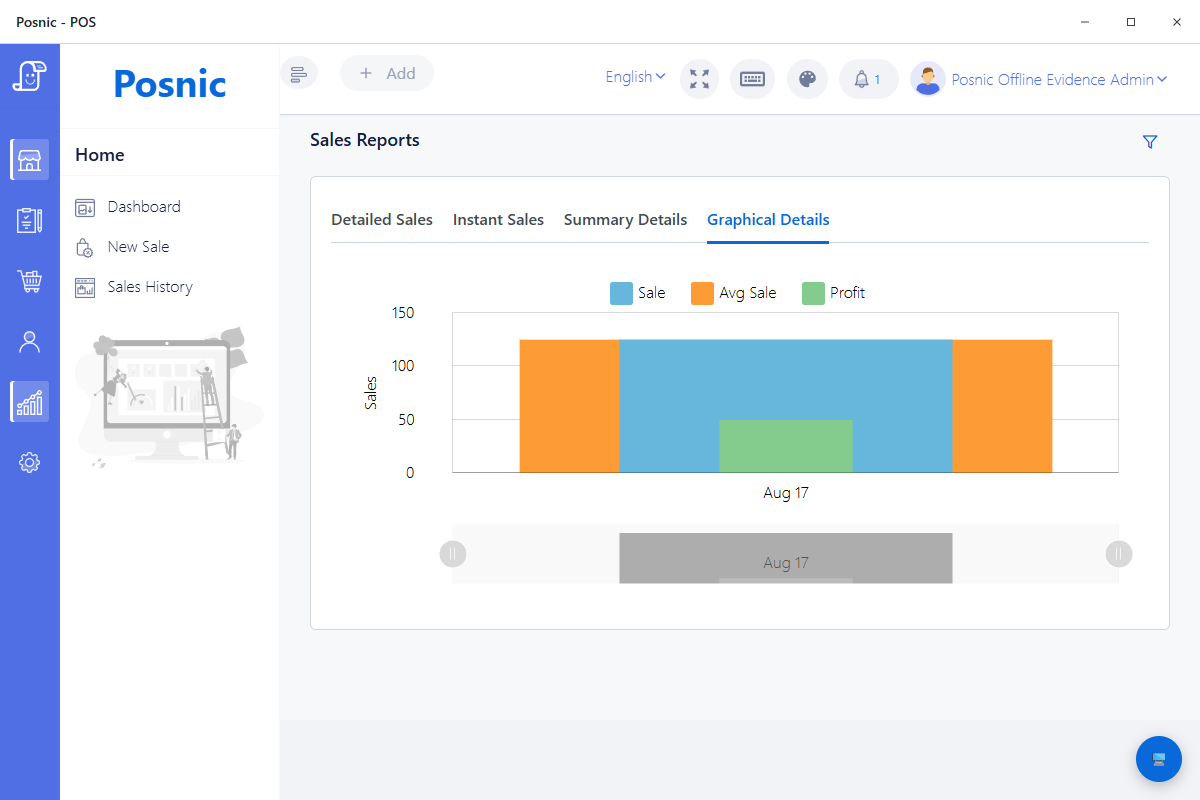
One graphical report was reproduced
A disposable Windows profile rendered one synthetic cash sale, S-O2MA-000001, with sale INR 125, average sale INR 125 and gross profit INR 50. This proves one local screen with one record, not every report or a restaurant operating day.
The documented report inventory is broader
The pinned user guide lists sales by day, item, category, branch and staff, plus purchases, inventory, expenses, GST and profit, and says reports can be exported. Each required report still needs a trial with the selected release and shop data.
270 focused API tests passed
Six sales and dashboard controller, service, model and route suites passed 270 tests. They cover source behavior and boundaries; they do not prove that every displayed total reconciles across a complete live shift.
13 focused desktop tests passed
Ten chart-lifecycle checks and three sales call-path checks passed. They establish disposal, timing, empty-data and named-call safeguards, not business correctness for every report.
Restaurant-specific routes exist
The pinned source exposes item, category, user, return, payment, export, KOT discount and table-wise report paths. A route in source is evidence to test, not proof that the full restaurant workflow passed.
Important decision fields remain unproved
A focused source search found no dedicated recipe, ingredient, waste, modifier, cover-count or menu-engineering model in the reviewed application paths. Do not describe Posnic gross profit as recipe-level contribution margin unless the cost source and calculation are accepted.
Match each decision to a report and a gap test
A current buyer should ask for the field, calculation, filter, export and reconciliation evidence behind each answer. Competitor report names are not a substitute for testing Posnic or any other selected product.
| Decision question | Current Posnic evidence | Acceptance evidence still required |
|---|---|---|
| What sold and in what quantity? | The guide documents item reports and the API has item table and graphical report routes. | Reconcile a known ticket set by item ID, quantity, gross sales, discounts, returns and net sales. |
| Which menu categories drive sales? | Category reporting is documented and a category sales route exists. | Confirm category history, renamed items, uncategorized items, refunds and exported totals. |
| Which branch or staff member recorded the sale? | Branch and staff sales are documented; user report routes exist. | Test permissions, timezone, transferred users, branch scope and the exact attribution rule. |
| How were sales paid and refunded? | Payment, return and pending report routes exist. | Reconcile cash, provider settlement, split or partial payment, refund timing and uncertain-payment cases. |
| What happened at tables or KOT? | KOT discount and table-wise routes exist; the pinned interface contains six KOT report tabs. | Run dine-in, takeaway, cancel, open-item, table transfer and kitchen-output cases end to end. |
| What did the item contribute after cost? | The reproduced graphical report displayed gross profit and the guide documents profit as sales less cost of goods. | Name the cost record used, its effective date, refund and discount treatment, tax basis and whether recipes are included. |
| Can reports be exported and recomputed? | The guide says every report can be exported and sales export routes exist. | Export the reference period, preserve row counts and hashes, and recompute totals independently. |
| Which item is popular and profitable? | Item quantity and a cost-based result can be inputs. | Calculate contribution margin as selling price less accepted variable item cost, then compare both margin and volume for the same period. |
| What explains kitchen load, waste or modifiers? | No dedicated model for these fields was established in the reviewed paths. | Capture them in an accepted operational system or manual study before using them to explain report results. |
| Did a menu change help? | Reports can provide before-and-after sales observations. | Keep comparable periods, record price and availability changes, and avoid claiming causation without controlling other changes. |
Practical workflow
Start with one decision
Choose one question, such as whether to keep, reprice, rename or relocate an item. Write the required fields and acceptance rule before opening a dashboard.
Use volume and contribution margin together
Menu engineering commonly compares units sold with contribution margin, meaning selling price less an accepted variable item cost. Gross sales alone can make a discounted or costly item look stronger than it is.
Reconcile before interpreting
Create a known ticket set with normal sales, discounts, voids, returns and payment cases. Match transaction records, report totals and settlement evidence before trusting rankings or charts.
Keep operational evidence separate
Preparation time, waste, stockouts, complaints, order source and labor may change a menu decision, but they require their own records when the POS report does not contain them.
Change a small set and measure again
Record the price, placement, recipe, portion or process change, then compare a representative later period using the same definitions. A before-and-after result is evidence, not automatic proof of causation.
A seven-step restaurant report acceptance path
Run this path in a test shop before basing menu or staffing decisions on a report. Keep ticket IDs, timestamps, exports, screenshots and named approvals.
Define the decision and period
Name the menu question, location, timezone, service modes and representative dates before collecting data.
Clean item identity
Give each item a stable ID, name and category. Record how variants, combos and renamed items should appear.
Build a reference ticket set
Include normal sales, discounts, voids, returns, multiple payment cases and one KOT or table case if used.
Reconcile source records
Match ticket IDs, quantities, tax, discounts, refunds, payment evidence and the expected day boundary.
Test filters and export
Repeat by item, category, staff, branch and date; export and independently recompute the known totals.
Calculate the decision metric
For menu engineering, pair volume with an accepted item contribution margin and retain the cost source and formula.
Change, observe and review
Change only a controlled set, collect a comparable period, record confounders and obtain owner approval before wider rollout.
Data and operating controls required
Hardware
- A test till using the exact Posnic release and configuration selected for rollout.
- Receipt or order evidence with stable transaction IDs and timestamps.
- The same kitchen, KOT or table output used in the planned restaurant workflow.
- Payment-provider evidence for every tender and refund case in the reference set.
- Separate storage for exported reports, screenshots, hashes and approval records.
Software and data
- A clean item master with stable IDs, categories, prices and tax treatment.
- A documented cost source and effective date for each item included in margin analysis.
- A written definition for gross sales, net sales, discounts, refunds, cost and contribution margin.
- Named report permissions and branch, staff, timezone and day-boundary rules.
- A CSV or spreadsheet method that recomputes the reference set independently.
Setup sequence
- Choose a representative test period and document location, timezone and service modes.
- Remove duplicate item identities and decide how variants, combos, open items and renamed items are treated.
- Enter an accepted cost record for items included in contribution-margin analysis; do not invent missing recipe costs.
- Run the reference ticket set and preserve transaction, receipt, payment and KOT evidence.
- Reconcile every required report and export before reviewing charts or rankings.
- Classify items only after both volume and accepted contribution margin are available.
- Record one controlled menu change and repeat the same report and reconciliation method.
What each person sees
Cashier or server
Uses stable item identities and approved discount, void, return and payment paths so the report has traceable inputs.
Kitchen manager
Reviews separate KOT, preparation, stockout and waste evidence instead of assuming sales totals explain kitchen performance.
Owner or analyst
Reconciles the period, preserves the cost formula and records which findings are measured, inferred or still unknown.
Product evidence to inspect
Mistakes to avoid
Avoid these during rollout
- Ranking items from gross sales without reconciling discounts, returns and quantity.
- Combining duplicate or renamed items without a documented identity rule.
- Treating displayed gross profit as recipe-level contribution margin without accepting the cost source and formula.
- Explaining kitchen load, waste, modifiers, covers or labor from fields the report does not contain.
- Changing the entire menu before a small controlled comparison can be measured.
- Treating a before-and-after sales difference as proof that the menu change caused it.
Run the 20-record restaurant report checklist
Record the exact release, reference tickets, filters, exports, cost source, reconciliation result and remaining feature gaps. Blank observation and decision fields prevent the worksheet from pretending that a test already passed.
Primary sources used
Posnic user guide
Pinned release documentation for sales, purchase, inventory, expense, GST, profit and export report scope.
Posnic sales report routes
Pinned source for item, category, user, return, payment, export, KOT and table-wise report endpoints.
Posnic report source tests
The six API and two desktop files used for the 283 focused passing checks remain inspectable at the exact source commit.
Cornell restaurant revenue research
Sheryl Kimes describes menu engineering through item contribution margin and volume within a broader restaurant revenue-management framework.
Toast product mix report documentation
A current vendor example showing item hierarchy, quantity, discounts, returns, cost-dependent margin, exports and explicit report limitations. It is a buyer-expectation reference, not Posnic evidence.
Square item and category report documentation
A current vendor example for item, category and modifier report fields, filters, exports and renamed-catalog behavior. It does not establish Posnic capability.
Questions
What is restaurant menu engineering?
It is a structured way to compare menu-item popularity with contribution margin, then combine that evidence with operating context before changing price, placement, recipe or promotion.
Which restaurant POS report should be checked first?
Start with item-level quantity and net sales for a reconciled reference period. Add category, discounts, returns, payment and cost only after their definitions match the source tickets.
Does the archived Posnic evidence automatically perform menu engineering?
No automatic menu-engineering classification was established in this review. Posnic report outputs can be tested as inputs, while the calculation and decision record remain an explicit acceptance step.
Does the archived Posnic evidence prove recipe, ingredient, waste or modifier reporting?
No. A focused review of the pinned application paths did not establish dedicated models for those fields. Keep them in another governed record until a later product release passes acceptance.
Can gross profit be used as contribution margin?
Only after the business accepts the underlying item cost, effective date, tax, discount and refund treatment. Recipe-level ingredient cost must not be assumed from a displayed gross-profit value.
How often should restaurant reports be reviewed?
Use a representative period and rerun after a controlled menu or process change. The right interval depends on trading volume, seasonality and data quality, not a universal weekly rule.
Where Posnic fits
Posnic Community Edition archived evidence run has bounded evidence for a local graphical sales view, documented report categories and 283 focused source tests. It does not have accepted recipe costing, ingredient depletion, waste, modifier, cover-count, labor-allocation or automatic menu-engineering evidence. Use the checklist to reconcile required reports before making live menu decisions.