POS operations guide
Billing machine setup guide: prove the bill, closing and restore
A printed total is not enough. A dependable billing machine must preserve who sold what, under which price and tax rule, how payment was recorded, what changed in stock and whether the same records survive closing and restore.
Evidence and review scope
Evidence reviewed 2026-08-18. Archived source and documentation, one reproduced local cash sale, a separate synthetic restore, 37 focused receipt, report and sales-path tests, and primary CBIC, PCI SSC, NIST and GS1 guidance.
Stable release: v1.9.0, source commit 567a176. No complete counter shift, customer tax setup, physical receipt, payment authorization, production stock reconciliation or country-wide billing compliance was accepted in this review.
What the current evidence establishes
Billing machine is an ambiguous label
The term can mean an electronic cash register, a computer with billing software, a printer-integrated device or a wider POS counter. Record the required sale, receipt, stock, payment and closing jobs before choosing the form factor.
A bill needs a durable identity
The minimum useful record links branch, sequence, date and time, operator, item lines, quantity, unit, price, discount, tax, payment result and later corrections. A paper receipt without the underlying record cannot support reconciliation or restore.
Current Posnic proof is narrow
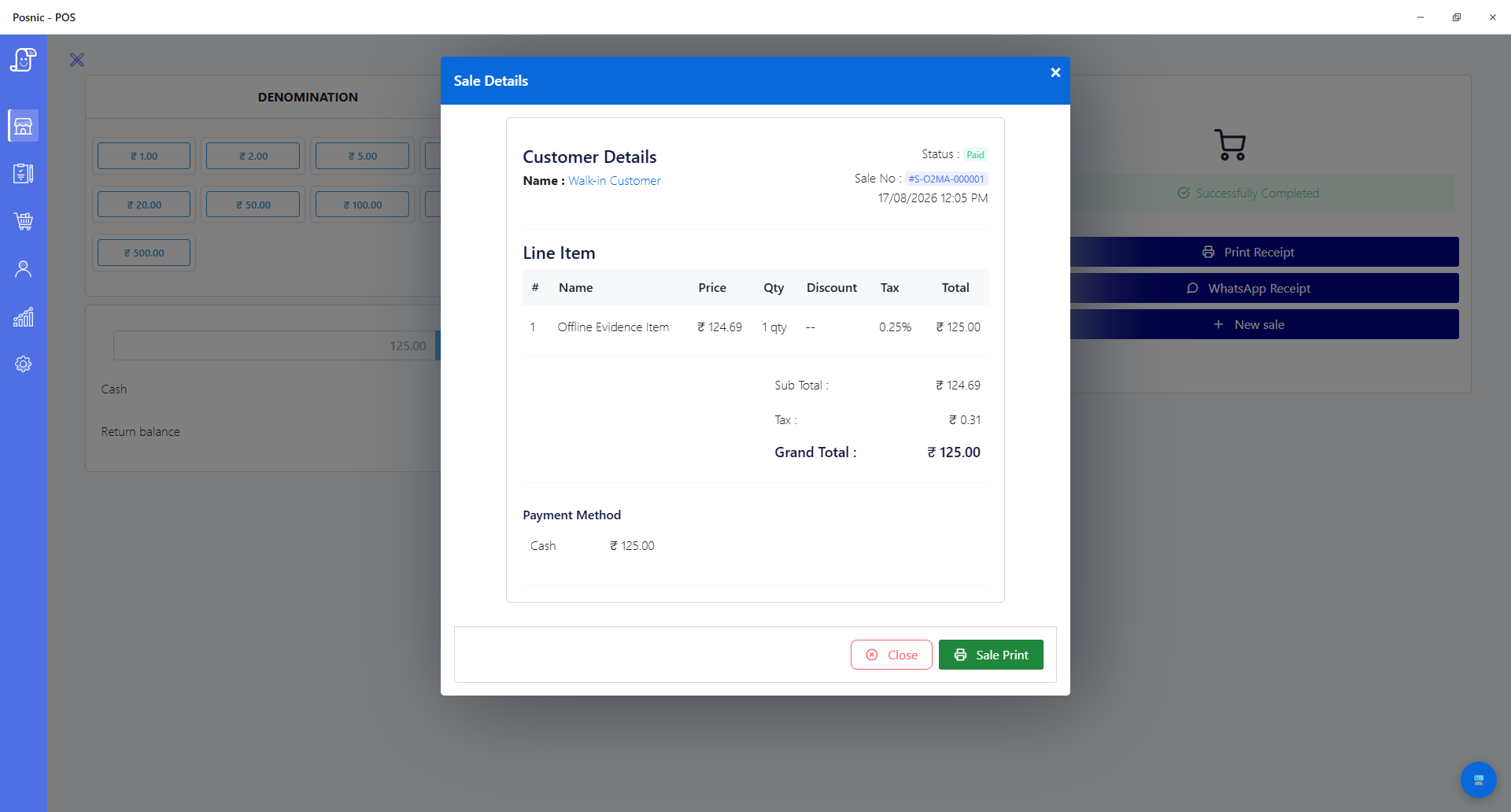
In the archived billing evidence run, 37 focused receipt, report, local-asset and sales call-path tests passed. One synthetic INR 125 Windows cash sale was stored and reopened; no physical receipt or complete shift was run.
Tax and payment acceptance remain local decisions
The application can store configured values, but configuration is not tax certification. Payment approval and settlement involve the provider and merchant environment. Use the applicable authority, acquirer and qualified adviser for the actual market.
Accept the record from opening data to restored closing
Run the same sample through setup, sale, correction, closing, export and restore. Every stage should preserve one explainable business event.
| Control | Acceptance question | Evidence to retain | Current Posnic boundary |
|---|---|---|---|
| Scope and identity | Which branch, device, operator, numbering series, date/time source and document type own the transaction? | Configuration export, role list, sequence sample and approved document map. | Sale and branch fields exist in the stable product; no customer numbering or jurisdiction acceptance was run. |
| Item and unit | Does search or scan select the intended item, unit, pack and quantity without silent substitution? | Item export, sample identifiers, rejected cases and bill IDs. | Items, quantities and barcode paths exist; no shop catalogue or physical scan was accepted. |
| Price and discount | Can the expected price and approved discount be reproduced and can an override be attributed? | Price list, rule version, operator, reason, approval and before/after bill. | Sale lines and discount fields exist; no customer pricing policy or complete override audit was accepted. |
| Tax and document | Do applicable item codes, rates, values, rounding, party fields and document labels match current local rules? | Authority source, adviser approval, configured sample and calculation worksheet. | Posnic stores configured tax data. The review is not tax certification and does not establish applicability in any market. |
| Payment and receipt | Does cash or provider outcome match the bill once and does the receipt show the approved content? | Bill, provider reference, settlement record, receipt sample and failed-payment result. | One synthetic cash sale and 29 receipt/report format tests were reproduced; no card or digital authorization or physical print was run. |
| Return and correction | Can a return, cancellation or void identify the original sale and explain money, tax and stock effects? | Original and correcting IDs, reason, approval, refund and item-movement evidence. | Return and cancellation paths are documented elsewhere; no complete correction lifecycle was accepted for this guide. |
| Stock and purchase | Does each accepted sale, return, purchase and adjustment produce the expected item movement? | Before/after quantities, movement IDs, purchase or sale references and physical count. | Stock records exist; no complete purchase-to-sale cycle or physical count was reconciled. |
| Closing and export | Do sales, payment methods, refunds, discounts, tax and cash reconcile to independent records? | Signed closing sheet, exported reports, cash count, settlement and variance reasons. | Report formatting is code-tested; no complete shift or external settlement reconciliation was observed. |
| Backup and restore | Can a clean replacement device recover the required records within the approved time? | Backup location, checksum or inventory, restore log, elapsed time and repeated report. | A separate synthetic profile restored 20 collections and 53 documents; it was not production data or a disk-loss event. |
Practical workflow
Write one approved sample bill
Before importing a catalogue, define a representative sale with item identity, unit, quantity, price, discount, tax, payment, receipt content and expected stock movement. Include a return and a failed-payment case beside it.
Configure ownership before speed
Create the branch, numbering, users and permissions before training. Decide who can change items, prices, taxes, discounts, payments, returns, voids, reprints and closing records, and require a reason where the business needs one.
Load clean item and tax data
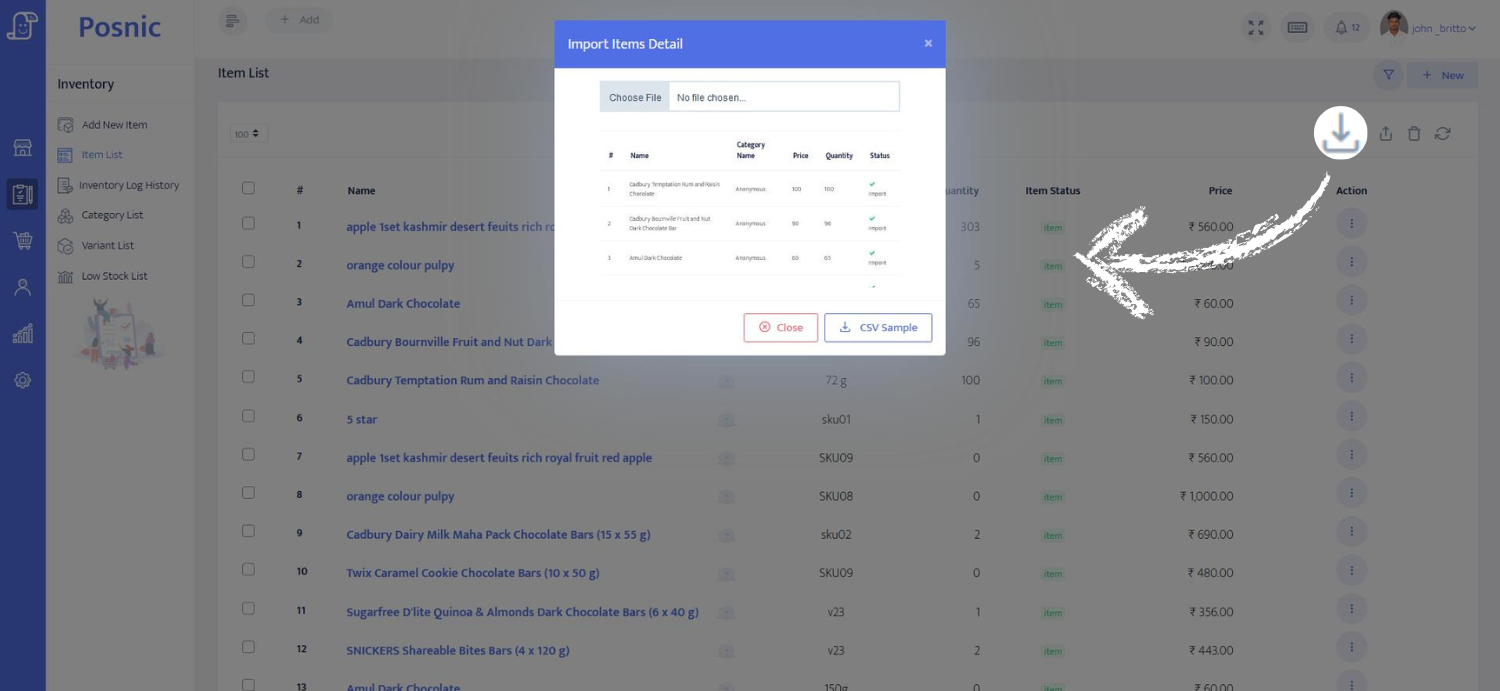
Standardize names, units, SKUs or barcodes, categories, prices and applicable tax groups. Preview imports, reject duplicates and truncation, then reconcile source rows to accepted, changed and rejected rows.
Make payment a matched record
The cashier should not turn a provider approval, screenshot or terminal slip into an unexplained POS total. Define when a bill becomes final, how failed or pending payments are handled and how settlement is compared at closing.
Print and reopen the same transaction
Check paper width, wrapping, character rendering, totals, tax labels, payment label, reprint marking and customer copy. Reopen the stored sale and compare it to the printed or shared receipt line by line.
Run corrections before go-live
Return, cancel, void, discount and price-change behavior should point back to the original event and leave an approved reason. Verify money, tax, stock and reports instead of checking only the new receipt.
Close and restore before the first real day
Count cash, compare every payment method, review returns and voids, export reports, take a protected backup and restore a clean device. A backup that has never been restored is only an untested file.
An eight-step billing-machine setup path
Use synthetic business and customer data until the configuration passes. Preserve the exact inputs and outputs so another person can reproduce the decision.
Define the bill
Choose one normal sale and the required identity, item, price, tax, payment, receipt and stock outcomes.
Assign control
Create branch and users; decide who may edit setup, override, refund, void, reprint, close and restore.
Prepare clean data
Standardize item identifiers, units, prices and tax groups and preserve the source-to-import reconciliation.
Configure the counter
Record software release, computer, printer, scanner, drawer, payment provider, network and backup path.
Run normal cases
Search or scan, sell, take each approved payment, print or share, reopen and verify the item movement.
Run exceptions
Test duplicate input, wrong price, failed payment, return, void, reprint, printer loss and internet loss.
Close and reconcile
Compare sales, cash, provider settlement, refunds, discounts, tax and stock to independent evidence.
Restore and approve
Recover a clean device, repeat one sale and report, record gaps and approve only the configuration that passed.
Records needed for a defensible setup
Master data and rules
- Branch identity, document types, numbering series, date/time owner and applicable authority source.
- User roles for setup, price, discount, tax, payment, return, void, reprint, close, export and restore.
- Item name, unit, SKU or barcode, category, price, applicable tax group and opening quantity.
- Rule version and approval for price, discount, rounding, tax, return and cancellation behavior.
- Payment methods, provider or terminal responsibility, finalization point, refund and pending-payment procedure.
- Receipt or invoice content approved for the business and jurisdiction, including language and paper width.
Operation and recovery evidence
- Normal sale, failed payment, return, void, reprint and correction IDs with expected and observed outcomes.
- Receipt samples compared to stored lines and totals at each required paper or document format.
- Sales-to-payment, sales-to-stock and closing reconciliation with named variance reasons.
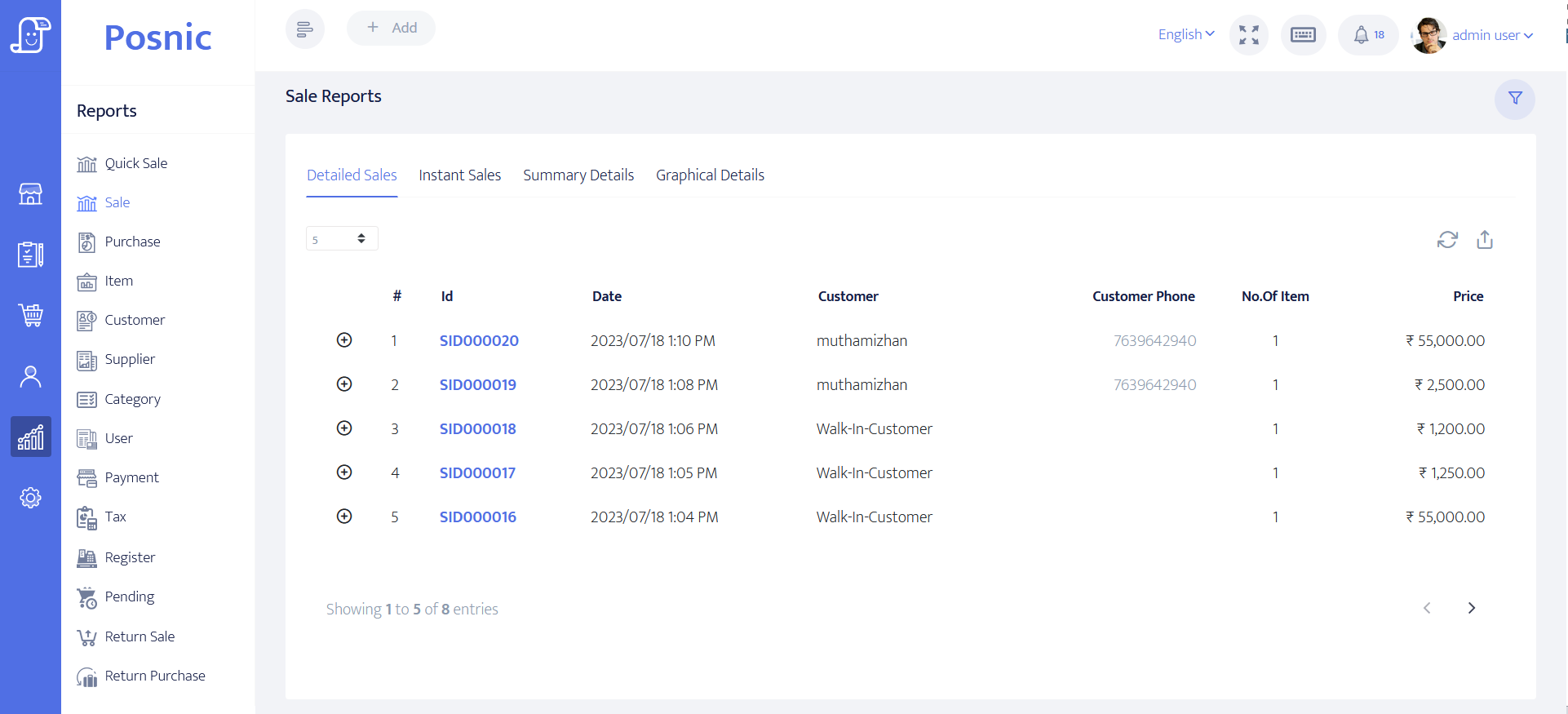
- Import counts and rejected rows plus independent exports for item, sale and report records.
- Backup location outside the failed device, retention owner and clean-device restore result.
- Unresolved gap, business owner, due date and explicit go-live pass or fail for every critical control.
Setup sequence
- Create a synthetic branch and users without real customer or payment data.
- Record the archived build, source boundary, computer, printer and each external dependency.
- Configure one approved numbering, item, unit, price, discount, tax and payment example from a qualified local review.
- Import a small clean catalogue and reconcile source, accepted, changed and rejected rows.
- Run cash and each provider-backed payment path including decline, timeout and retry without creating duplicate bills.
- Print and reprint the sale, compare the receipt to the stored transaction and retain the sample and bill ID.
- Run full and partial return, void and correction cases and verify payment, tax, stock and report effects.
- Remove one printer or network dependency and record what remains possible and how the counter recovers.
- Close the synthetic shift and reconcile sales to cash, provider settlement and expected item movements.
- Export, back up and restore onto a clean device; reopen the same records and repeat one report before approval.
What each person sees
Customer
Needs the correct item, amount, tax treatment, payment outcome and receipt plus a practical correction path.
Cashier
Needs fast normal entry and a clear stop for duplicate input, wrong price, failed payment, printer loss and return exceptions.
Manager
Needs approved overrides, reasons, original-to-correction links, closing variance review and incident ownership.
Owner or accountant
Needs current local rule approval, payment reconciliation, tax and stock reports, independent exports and recoverable records.
Support
Needs the exact release, configuration, device details, logs, backup, restore steps and owner for each unresolved dependency.
Product evidence to inspect
Mistakes to avoid
Avoid these during rollout
- Choosing a device before defining the bill and correction workflow.
- Importing a full catalogue before a small file reconciles source, accepted and rejected rows.
- Copying tax settings from another business or old period without current local review.
- Finalizing a bill before payment outcome is known or retrying without duplicate protection.
- Checking only the printed total and not the stored line, payment, tax and stock records.
- Allowing price, discount, tax, return, void or reprint changes without role, reason and review.
- Closing from the POS report alone without cash and provider settlement evidence.
- Keeping exports or backups only on the same billing computer.
- Calling setup complete before a clean-device restore and repeated report pass.
Run the 18-record billing-machine checklist
The editable worksheet covers scope, branch identity, users, items, tax, price, payment, receipt, corrections, stock, closing, export and restore. Observed results remain blank until the exact setup is exercised.
Primary sources used
archived Posnic evidence
The stable release fixes the product, build and download boundary discussed in this review.
Pinned Posnic user guide
Versioned billing, item, sales, return, report and operating documentation for the stable source boundary.
Pinned Posnic backup policy
Local backup locations, same-device risk, retention and restore responsibilities for business records.
CBIC tax invoice rules
An official India-specific example of required invoice particulars. It does not define requirements outside its legal scope or replace current qualified advice.
PCI SSC payment-terminal FAQ
Official guidance that payment terminals are part of the cardholder-data environment and need applicable configuration and controls.
NIST SP 800-34 Rev. 1
Primary contingency-planning guidance covering business impact, recovery strategies, plan development, testing and maintenance.
GS1 EAN/UPC standards
Primary identification and barcode resources for common retail consumer products and scanner environments.
Questions
What is a billing machine?
The term can describe an electronic cash register, a printer-integrated terminal or a computer running billing software. Compare the required records and workflows before comparing the physical form.
Is a billing machine the same as a POS machine?
They overlap in everyday language. This guide owns setup and daily billing records; the POS-machine guide owns complete-counter procurement and separates the checkout workstation from a payment terminal.
Can archived Posnic evidence print receipts?
Its 58 mm and 80 mm receipt and report renderers passed 29 focused source tests, including width, wrapping, amounts, cutter and drawer commands. No physical printer was connected in this review, so test the exact model and paper.
Does Posnic make a business tax compliant?
No. Software stores configured values and can produce records, but applicability, item codes, rates, document content, numbering, reporting and retention depend on current local rules and the business. Use the relevant authority and qualified adviser.
Does a billing machine need internet?
Some local application tasks may continue without external internet, but provider payments, cloud services and support may not. The prior runtime observation blocked external hosts inside Electron; it was not a router, power or operating-system disconnection.
What should a cashier test before go-live?
Normal sale, wrong price, duplicate input, every payment method, failed payment, receipt, return, void, reprint and closing handover using the approved sample data.
Why test backup restore during setup?
The billing record is the business evidence. A clean-device restore proves more than a backup file exists and exposes missing software, credentials, media, time or procedure before a real failure.
Where Posnic fits
Posnic Community Edition archived evidence run is open-source billing and POS software. Thirty-seven focused receipt, report, local-asset and sales-path source tests passed; one synthetic local Windows cash sale and a separate synthetic restore were reproduced. No complete shift, physical receipt, provider payment, customer tax setup or production stock reconciliation was accepted, so use the worksheet before go-live.