POS operations guide
POS machine buying guide: choose the complete counter, not one box
POS machine can mean a checkout computer, an all-in-one till or only the card terminal. Define the job first, separate payment approval from billing, then accept the exact hardware, software and recovery path before buying every lane.
Evidence and review scope
Evidence reviewed 2026-08-17. Archived hardware documentation, 35 receipt, report and scale protocol tests, one reproduced local cash sale, current PCI SSC payment-terminal guidance and current GS1 retail-scanner guidance.
Stable release: v1.9.0, source commit 567a176. No named POS computer, printer, scanner, drawer, scale, payment terminal or complete counter was physically certified, and no Canada, India or other local hardware dealer or service coverage was established.
What the current evidence establishes
The search term names different products
Some buyers use POS machine for the computer and billing software; others mean a card reader or an integrated smart terminal. Record whether the requirement is transaction entry, payment acceptance or both before comparing prices.
One local transaction was reproduced
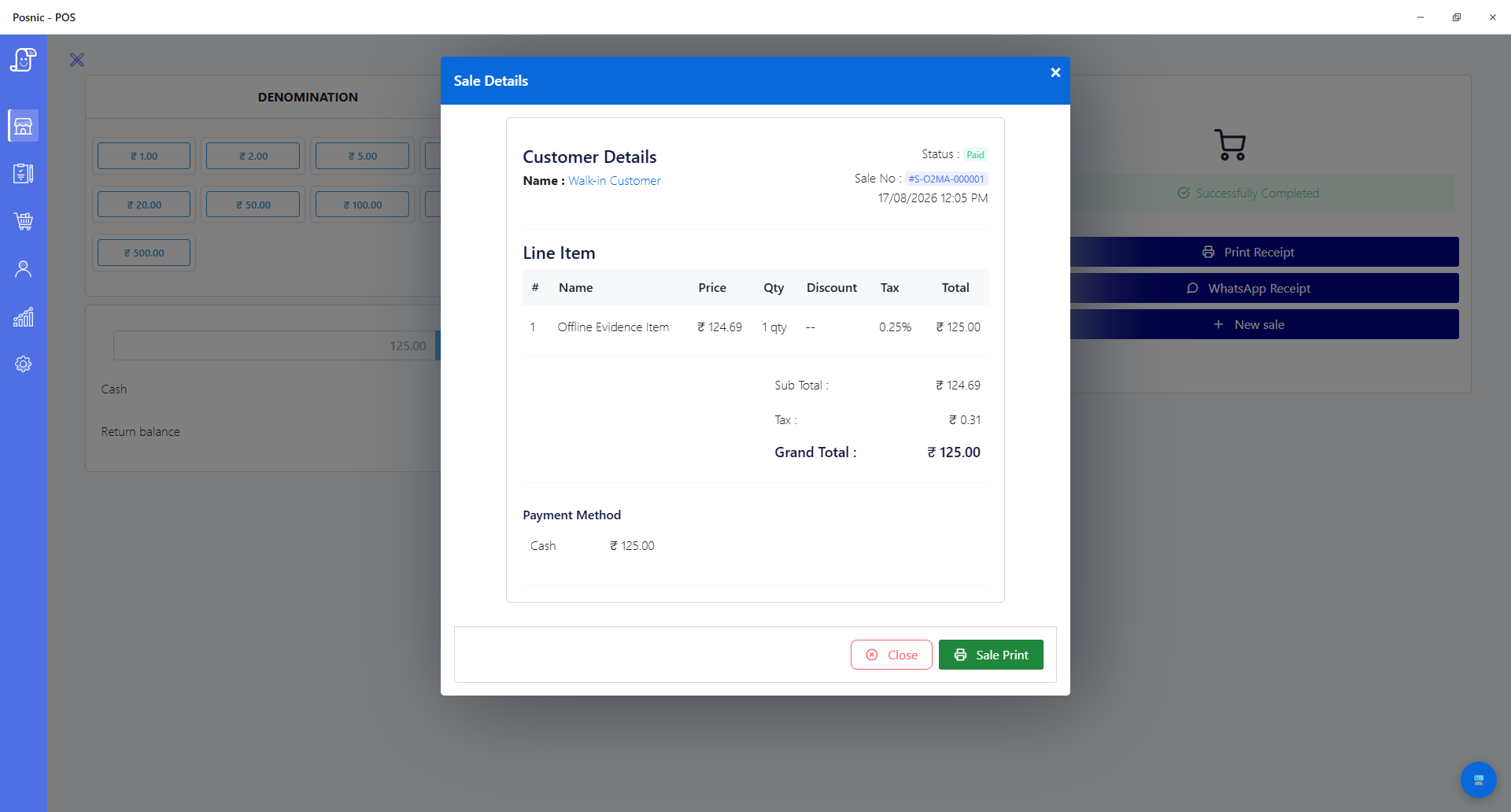
The pinned Windows x64 portable archived evidence run artifact stored and reopened one synthetic INR 125 cash sale. That proves a narrow local application path, not a complete shift, card authorization, connected peripheral set or customer deployment.
Protocol tests are not device certification
Thirty-five source tests passed for receipt and report width, wrapping, drawer and cutter commands, and supported scale-frame parsing. No physical device was connected, so the exact model, cable, driver, firmware and operating system remain acceptance variables.
Payment approval is a separate boundary
The pinned Posnic matrix does not claim an integrated PIN-pad driver. PCI SSC treats payment terminals as devices in the cardholder-data environment; the acquirer, payment provider, approved device, configuration and merchant controls must be confirmed separately.
Specify the complete POS machine before comparing a price
A low hardware quote is not comparable when software, payment processing, peripherals, support, replacement and data recovery are missing or bundled under different terms.
| Layer | Decision to make | Evidence to keep | Current Posnic boundary |
|---|---|---|---|
| Meaning and workload | Fixed counter, mobile order entry, self-service or payment-only; transaction types, lanes, peak bills and queue target. | Written workflow, peak-volume sample, counter drawing and named owner. | The guide covers a staffed checkout. It does not claim a certified payment-only or unattended terminal. |
| Computer and display | Operating system, processor, memory, SSD, screen, ports, mounting, cooling and service access. | Exact make, model, specification, OS build, warranty and replacement lead time. | The pinned matrix documents Windows requirements and published macOS and Linux builds; no named computer was physically certified. |
| POS software and data | Billing, item data, tax, stock, users, reports, export, backup, restore and update ownership. | Trial result, sample exports, backup location, clean-device restore and exit plan. | One synthetic Windows cash sale and a separate synthetic restore were reproduced; no complete operating day was accepted. |
| Receipt printer and drawer | 58 mm or 80 mm paper, ESC/POS or operating-system printing, cutter, drawer kick and consumables. | Model, interface, driver, sample bill, cut, open, reprint and failure test. | Receipt, report, drawer and cutter paths are code-tested; no physical printer or drawer was connected. |
| Barcode scanner | 1D or 2D symbols, keyboard-wedge mode, scan distance, damaged labels and repeated scans. | Model, firmware, mode and identifier-to-item acceptance log. | USB, Bluetooth and 2D keyboard-wedge behavior is documented by standard; serial scanner mode and named models are not accepted. |
| Weighing scale | Supported protocol, continuous output, units, decimal precision, stability and legal-metrology duties. | Model, calibration or verification record where required, sample weights and receipt results. | Essae DS-series, T-Scale and generic continuous ASCII parsing is code-tested; no physical scale was connected. |
| Payment terminal | Acquirer, provider, card methods, settlement, refunds, outage behavior, device approval and support. | Acquirer approval, exact terminal listing, application, configuration, fees, settlement and incident owner. | Posnic records payment outcomes but the pinned matrix does not claim an integrated PIN-pad driver or a certified card terminal. |
| Network and power | What continues during WAN, LAN, router, local-service, device and power failures. | Dependency map, UPS runtime, outage drill, recovery time and reconciliation evidence. | Local availability was observed under blocked external-host resolution, not by disconnecting Windows, a router or power. |
| Support and ownership | Who installs, trains, patches, replaces and supports every component; who owns data and contract exit. | Supplier responsibilities, support hours, response terms, spare plan, warranty, export and deletion terms. | Posnic publishes software and evidence pages. This review establishes no local hardware dealership, onsite service promise or named-device warranty. |
Practical workflow
Start with the transaction, not the catalogue
Write the fastest normal sale and the hardest exception: search or scan, quantity, price, tax, discount, payment, receipt, stock movement, return and close. Add restaurant, service, weighed-item or delivery steps only when the business actually uses them.
Treat the workstation as a replaceable configuration
Record the computer, operating system, ports, printer, scanner, drawer, scale, display and network as one versioned counter. A spare machine is useful only when the installer, drivers, data and restore steps are also available.
Separate POS software from the card terminal
The POS can calculate and record a bill while a separate payment terminal obtains authorization and settlement. Integration may reduce re-entry, but it also changes payment scope, dependencies and support ownership. Ask the acquirer which exact device and application are approved for the market.
Prefer evidence over compatibility words
Compatible should identify the exact model, connection, driver, firmware, operating system, software release, test cases and date. Code-tested and by-standard paths are useful shortlisting evidence, but they are not equivalent to a physical counter test.
Price the operating term
Compare hardware, licences, payment fees, paper, labels, network, UPS, installation, training, support, replacements, upgrades, backup storage and exit work over the same period. Record one-time and recurring amounts separately.
Plan a failure before opening
Test internet loss, local-service failure, printer loss, scanner loss, payment-terminal loss and power interruption. Define which payment methods remain available, how staff mark exceptions and how duplicated or pending records are reconciled after recovery.
Buy one accepted lane before buying many
Run the exact devices, data, taxes, payment provider, receipt and closing routine under realistic volume. Preserve screenshots, bills, exports, error logs and signed results, then clone only the configuration that passed.
An eight-step POS machine acceptance path
Use real item shapes and transaction rules with synthetic customer data. Keep every result tied to one exact configuration so the decision can be reproduced.
Define the word
State whether POS machine means the checkout workstation, the card terminal or an integrated device, and list what is outside the purchase.
Map the lane
Record counter space, staff movement, peak bills, transaction types, peripherals, payment methods, network and power.
Name every dependency
List software release, operating system, drivers, device firmware, acquirer, payment application, support owner and recurring service.
Shortlist complete configurations
Compare one working combination at a time, including cables, stands, paper, UPS, backup and replacement route.
Run normal checkout
Search and scan items, apply approved tax and price rules, take each payment method, print or share a receipt and verify stock.
Run exceptions
Test duplicate scan, wrong price, return, void, failed payment, printer outage, scanner outage, WAN loss and interrupted application.
Close and restore
Reconcile sales, payments, refunds, stock and cash, export the records, restore a clean device and repeat the comparison.
Approve one lane
Record pass or fail, unresolved gaps, owner, support terms and total cost before ordering or cloning more counters.
Evidence to request before purchase
Configuration and supplier record
- Exact make, model, hardware revision, operating system, connection and firmware for every device.
- Software edition, release, licence, update channel, supported database and minimum computer specification.
- Payment acquirer, terminal, application, settlement account, market approval, fees and responsibility split.
- One-time price, recurring price, consumables, installation, training, support, warranty and replacement lead time.
- Counter drawing, cable and port list, network dependency, UPS requirement and spare-device plan.
- Data ownership, export formats, backup locations, restore procedure, retention and contract-exit terms.
Acceptance and recovery record
- Normal sale, discount, tax, cash, digital or card, receipt, return, void and closing evidence.
- Barcode and scale samples covering units, packs, precision, repeated input and rejected data.
- Printer cut, reprint and drawer result with paper-width, encoding and power-cycle evidence.
- WAN, local-service, printer, scanner, payment-terminal and power-failure results with staff actions.
- Sales-to-payment, sales-to-stock and cash reconciliation after normal operation and recovery.
- Clean-device install and restore proof, including time taken, missing data, unresolved errors and named approver.
Setup sequence
- Create a synthetic branch, users, taxes, payment methods and representative items without customer personal data.
- Record every device make, model, connection, driver, firmware, operating system and Posnic release in the worksheet.
- Run search, barcode, quantity, discount, tax, cash and separate-terminal payment cases and preserve the resulting bill IDs.
- Print 58 mm or 80 mm samples as applicable, test cutter and drawer behavior, and compare every amount and character.
- Run any scale with known sample weights, stability states, units and decimal precision under the applicable local rules.
- Complete return, void, failed-payment and duplicate-input cases and reconcile their payment and stock outcomes.
- Remove internet, stop one local dependency, make a printer or scanner unavailable and record the exact remaining workflow.
- Close the shift and reconcile POS totals to cash, payment-provider settlement and expected item movements.
- Export and back up the accepted state, install a clean replacement device, restore it and repeat one sale and report.
- Approve the configuration only after unresolved failures, support ownership, total cost and replacement time are written down.
What each person sees
Customer
Needs the correct item, amount, payment outcome and receipt without being exposed to internal recovery work or duplicate charging.
Cashier
Needs fast normal entry and a clear stop or fallback for scan, price, printer, payment and network exceptions.
Manager
Needs controlled overrides, returns, voids, reprints, closing, incident ownership and evidence for unresolved differences.
Owner or accountant
Needs comparable total cost, sales and settlement reconciliation, tax review, data access, backups and an exit route.
Installer or support
Needs the exact configuration, logs, drivers, firmware, spare plan, restore steps and responsibility boundary for every dependency.
Product evidence to inspect
Mistakes to avoid
Avoid these during rollout
- Using POS machine, billing terminal and card machine as if they always describe the same device.
- Buying an all-in-one unit before confirming data export, peripheral replacement and contract exit.
- Assuming a PCI-approved payment device alone makes the merchant environment compliant.
- Treating code-tested or standards-based compatibility as a named physical-device certification.
- Comparing hardware purchase price while excluding payment fees, support, consumables, replacement and migration.
- Buying multiple lanes before one complete configuration passes normal, exception, closing and restore tests.
- Calling local billing offline-ready without testing payment, network, power, recovery and reconciliation separately.
- Depending on a local dealer or onsite response that is not named in a written supplier commitment.
- Keeping backups on the same device and never proving a clean-device restore.
Run the 18-test POS machine worksheet
Record the exact device, connection or provider, expected result, observed result and evidence for the counter you are buying. Blank observation fields prevent the worksheet from pretending an untested configuration passed.
Primary sources used
archived Posnic evidence
The stable release fixes the software and download boundary discussed in this review.
Pinned Posnic hardware matrix
Versioned computer requirements, protocol support levels, unsupported paths and physical-device limitations.
Pinned Posnic backup policy
Local backup locations, same-device risk, restore testing and responsibilities for protecting business records.
PCI SSC PTS Point of Interaction
Official device-security scope and the Council's approved PTS device listing for merchant and acquirer selection.
PCI SSC payment-terminal scope FAQ
Official guidance that payment terminals are in the cardholder-data environment and require applicable configuration and merchant controls.
PCI SSC terminal assessment FAQ
Official guidance that a PTS-approved terminal alone does not guarantee PCI DSS compliance or automatically reduce scope.
GS1 retail 2D implementation guide
Current primary guidance for scanner decoding, host processing, GTIN formats and the transition to 2D barcodes at retail POS.
Questions
What is a POS machine?
The term is ambiguous. It can mean the computer and software used to create and record a sale, a payment terminal that reads card credentials, or an integrated device that does both. Write the required jobs before comparing products.
Is a POS machine the same as a card machine?
Not necessarily. A checkout POS can calculate tax, update stock and record a sale while a separate card terminal obtains authorization and settlement. PCI SSC treats payment terminals as part of the cardholder-data environment.
Does Posnic sell or certify POS machines?
This review establishes Posnic software, protocol tests and published hardware guidance. It does not establish a hardware dealership, named physical-device certification, local installation coverage or onsite service in any country.
Can I reuse an existing computer?
Potentially, when it meets the pinned operating-system and hardware requirements and the complete counter passes installation, peripheral, checkout, closing and restore tests. Do not approve it from specifications alone.
Does a POS machine need internet?
Some local billing tasks can continue without external internet, but card authorization, cloud services, remote support and other dependencies may not. Test each failure separately and define the approved fallback.
Should I buy an all-in-one POS terminal?
Only after checking serviceability, operating-system and software support, peripheral interfaces, payment scope, data export, replacement time and contract exit. Integration saves space but can concentrate lock-in and failure.
What should I test before buying several units?
Run normal and exception sales, every payment method, receipt and drawer behavior, scanner or scale cases, outages, closing reconciliation, backup and a clean-device restore on one exact configuration first.
Where Posnic fits
Posnic Community Edition archived evidence run is open-source POS software with published Windows, macOS and Linux builds. One synthetic local Windows cash sale and 35 receipt, report and scale protocol tests were reproduced. No physical counter, named device, integrated payment terminal, complete shift or local hardware-service network was accepted; run the worksheet before buying a configuration.