Stable-release bookstore decision record
Bookstore POS software evaluation
Posnic v1.3.0 has inspectable generic item, barcode, category, supplier, import, stock, receiving, return, receipt, report and backup paths. It is not presented here as an ISBN catalogue, book-metadata service, school-set bundle engine, special-order system or proof of a completed bookstore shift.
Reviewed 18 Aug 2026 at archived source commit b531ef4.
Inspect the existing interface before testing a bookshop
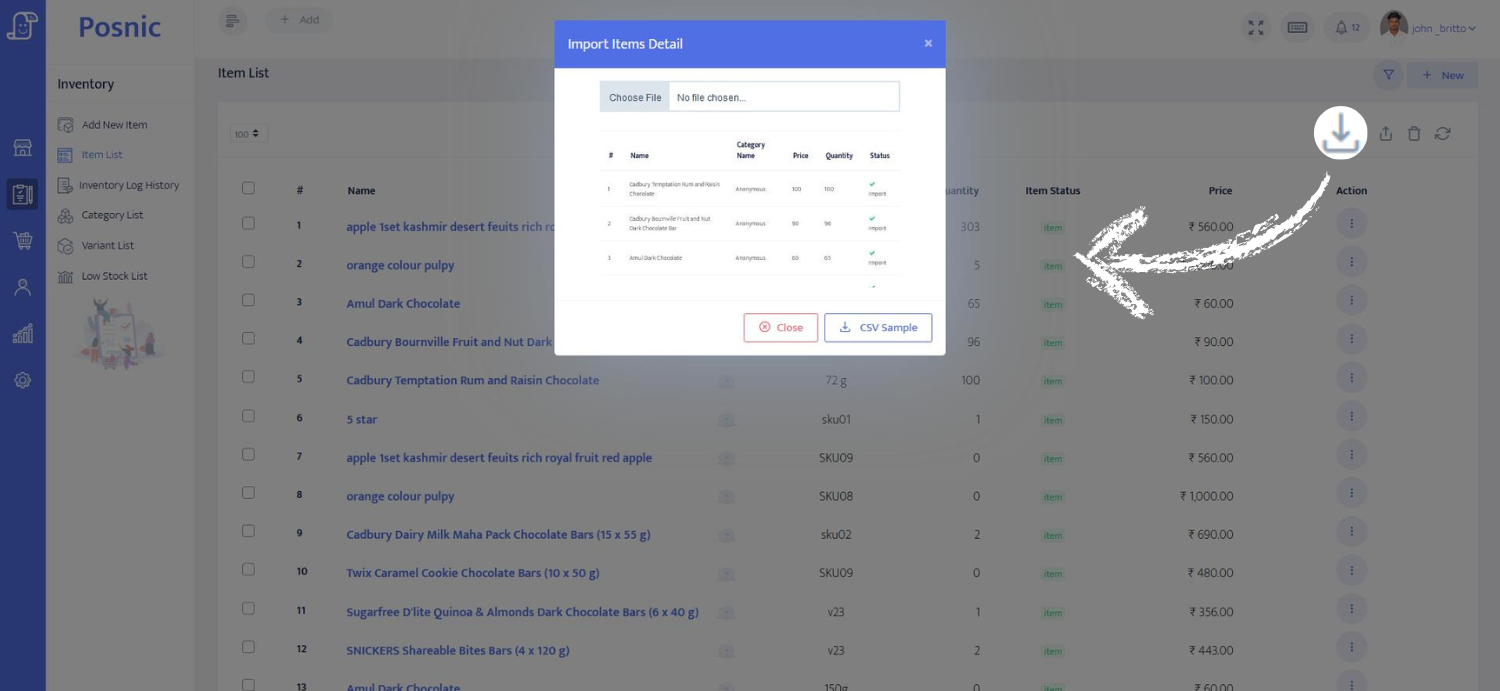
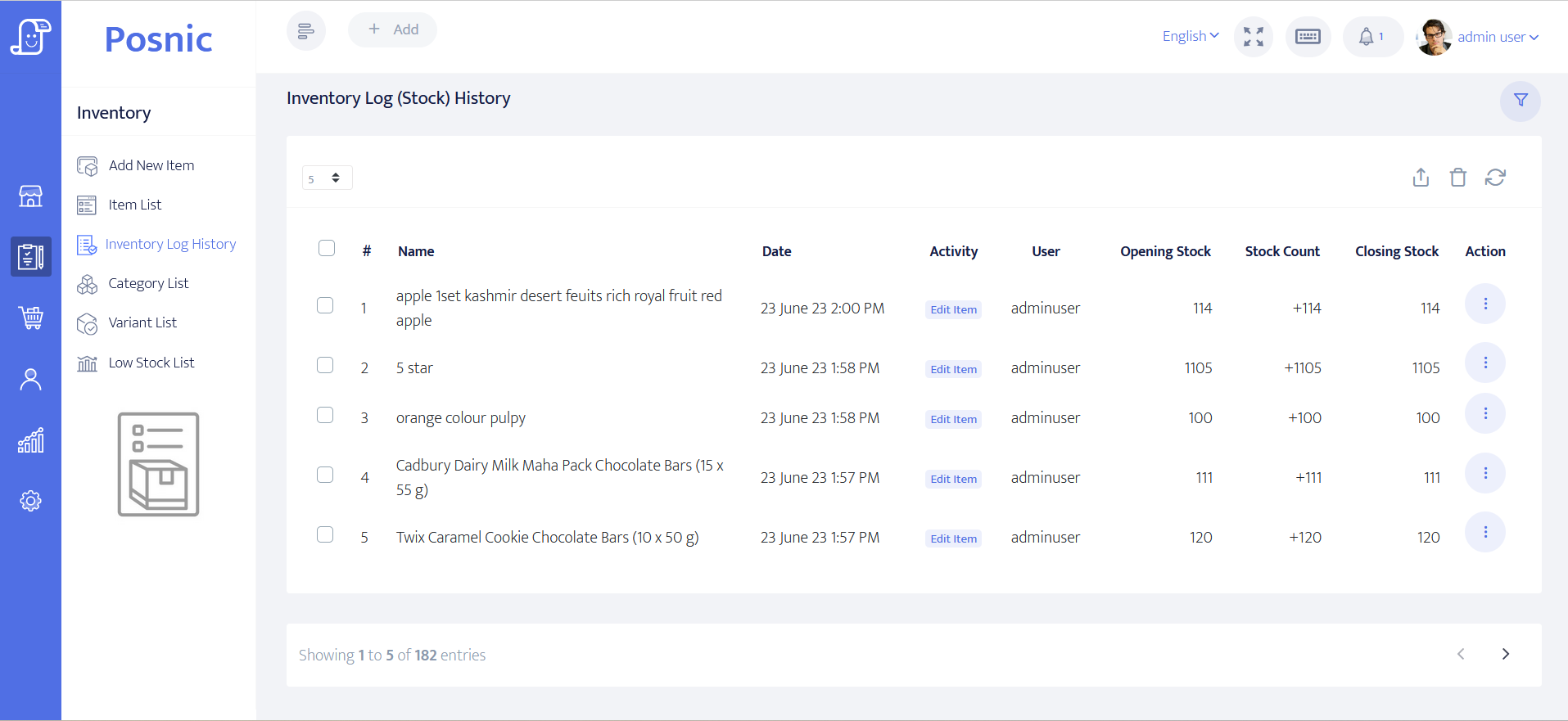
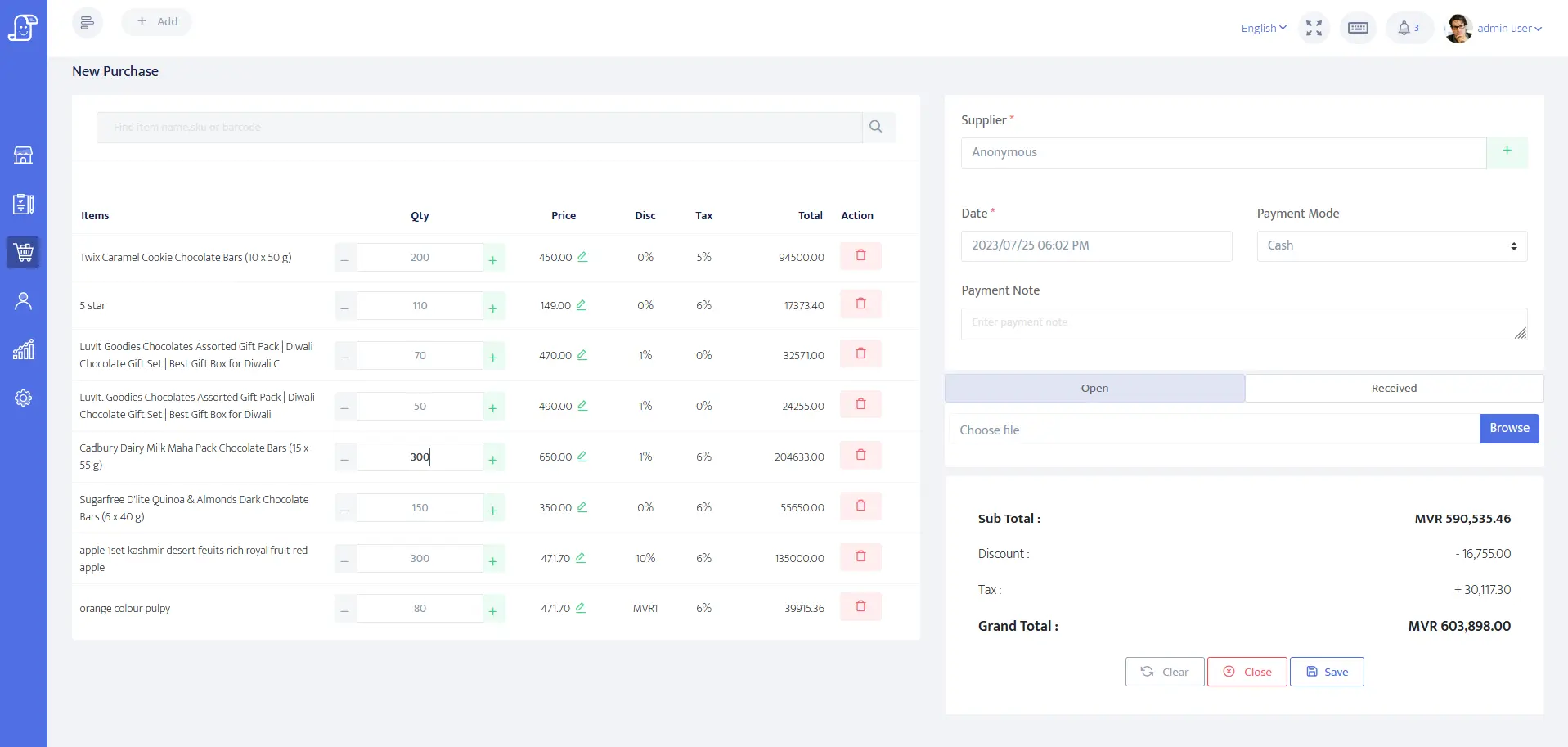
These are existing Posnic interface captures with synthetic retail data. They show visible import, stock-history and purchase-entry surfaces; they are not bookstore customer results, ISBN validation, a physical count or an accepted supplier reconciliation.
What the tagged public source establishes
The exact tag and lockfiles were reproduced on Microsoft Windows NT 10.0.26200.0 with Node.js 24.19.0. All 2,110 selected tests passed, but they are source-level evidence rather than a live bookstore acceptance.
| Evidence path | Observed result | Useful bookstore question | Boundary |
|---|---|---|---|
| Item model | Generic barcode, SKU, name, category, supplier, price, tax and quantity fields are present | Can the approved catalogue map to the fields without losing identity or required attributes? | No first-class ISBN, author, publisher, edition, format, class or subject field was established. |
| Item search and stock source | Exact barcode and item-name search paths, low-stock filtering, bulk stock changes and CSV import paths are present | Does an exact approved code resolve one item, and do stock changes retain the expected result? | A generic barcode is not ISBN validation; a bulk adjustment is not a formal physical-count workflow. |
| Item CSV template | Six template checks and selected import repository tests passed | Can a copy of the real catalogue be trial-imported and reconciled in a test database? | The shipped columns do not contain structured book metadata, and no real bookstore file was imported in this review. |
| Receiving and supplier-return service | Selected receiving, return, supplier, stock-log and item tests passed | Do representative purchases and supplier returns reconcile quantity, cost and movement records? | No supplier document, physical delivery or bookshop return was executed. |
| Sale and return service | Selected sale, report, receipt and call-path tests passed | Can the accepted sale and return samples retain totals, references and readable long titles? | No complete checkout, payment-terminal settlement, printed invoice or end-of-day close was accepted. |
| Backup path tests | 14 selected desktop backup boundary checks passed | Can the shop define where backups may be restored from before running its own recovery drill? | These tests did not restore a real-sized bookstore database or measure recovery time. |
Reproduction boundary: 51 desktop tests passed in 16.273 seconds. 2,059 API tests in 19 suites passed in 18.072 seconds. No selected test failed or skipped. No physical scanner, printer, payment terminal, bookstore dataset or complete shift was used.
An ISBN is an identifier, not a complete book catalogue
The International ISBN Agency describes ISBN as a 13-digit product identifier used for ordering, listing, sales records and stock control. Distinct editions and product forms can require distinct ISBNs. Posnic's reviewed field is a generic barcode string, so the business must preserve its own approved metadata and identity rules.
| Decision question | Independent baseline | Posnic v1.3.0 boundary |
|---|---|---|
| Which product does this code identify? | International ISBN Agency: what an ISBN identifies | Store and look up a generic barcode only after proving the exact catalogue mapping; no ISBN checksum or edition validation was established. |
| Can a scanner read it at checkout? | International ISBN Agency: ISBN benefits | The agency notes machine-readable EAN-13 use at bookshop POS. Posnic still requires the exact scanner, timing, duplicate and unknown-code cases to pass locally. |
| How are shelf counts accepted? | Square: full and cycle inventory counts | This category example distinguishes full and cycle counts with review and approval. No equivalent formal Posnic count session was established. |
| How is stock traceability designed? | GS1 Global Traceability Standard | Use product, location, event, movement, data and responsibility questions to design the local record. Source paths alone do not certify traceability. |
| Who owns payment compliance? | PCI SSC merchant resources | Identify the actual payment provider and account-data flow. No payment terminal or provider settlement was included in this review. |
Eight outcomes this evidence does not prove
ISBN and metadata quality
No ISBN checksum, metadata lookup or structured author, publisher, edition, format, class or subject workflow was established.
Author and subject search
Generic item-name and barcode search do not prove reliable search across structured contributors, series, subjects, curricula or alternate titles.
School sets and bundles
No component bundle path was accepted for depletion, substitutions, partial returns, missing books or replacements.
Reservations and special orders
No complete customer promise, supplier order, deposit, balance, status, cancellation and collection workflow was established.
Physical inventory count
Stock quantities, logs and bulk adjustments exist, but no accepted count session with scope, freeze rule, variance review and approval was demonstrated.
Physical counter
No scanner, receipt printer, drawer, customer display or payment terminal was connected, and no paper invoice was reviewed.
Complete closeout
No bookstore shift reconciled sales, returns, cash, payment provider, tax, purchases and stock movements.
Production dependency approval
The lockfiles reported 27 npm audit findings, including 5 critical findings in the desktop tree. Severity is not exploitability, but remediation and qualified review are still required.
Run one representative bookstore day before approval
The downloadable record leaves observation, evidence, ownership, specialist review, pass or fail and follow-up fields blank. Fill it with the shop's own catalogue, editions, stationery, suppliers, taxes, staff, devices, payment route and recovery target.
| Stage | Run with representative evidence | Retain before approval |
|---|---|---|
| 1. Catalogue | Choose books with reused titles, distinct editions and formats, plus stationery and services. | Approved source, identifiers, metadata ownership, duplicate policy and field mapping. |
| 2. Import and lookup | Trial-import a copy, search approved names and scan valid, duplicate, unknown and damaged codes. | Input file, rejected rows, before and after counts, timings and exact device configuration. |
| 3. Counter and returns | Run cash and non-cash sales, long titles, discounts, corrections, full returns and exchanges. | Transaction references, approved tax results, payment evidence, receipt or invoice output and exceptions. |
| 4. Purchasing and stock | Receive supplier stock, return damaged stock, trigger low-stock and perform a representative shelf count. | Supplier records, stock movement chain, count variances, approvals and reorder owner. |
| 5. Unsupported workflows | Exercise required sets, reservations, special orders, deposits, customer promises and collection. | Accepted external system or a tested implementation with named ownership and failure handling. |
| 6. Close and recover | Reconcile one opening-to-close day, interrupt the approved environment, back up and restore a real-sized test copy. | Close report, provider and cash evidence, restore result, elapsed time, unresolved differences and sign-off. |
Keep each retail question with the right owner
| Need | Use this owner | Reason |
|---|---|---|
| Book identifiers, editions, catalogue, purchasing, stock and bookstore acceptance | This bookstore POS guide | It owns the broad bookstore decision and preserves the product's explicit metadata and workflow gaps. |
| Stationery and school-set operating questions | Bookshop and stationery workflow guide | It is a narrower supporting workflow; bundle and special-order claims still require the acceptance evidence stated here. |
| Barcode setup and scan procedure | Barcode setup guide | Scanner setup is a separate device and workflow decision; a generic barcode is not ISBN validation. |
| Catalogue CSV preparation | Import products from CSV | Migration quality depends on the actual file, field mapping, rejected rows and reconciliation. |
| Exact scanners and printers | POS hardware compatibility | Physical acceptance is make, model, connection, driver, configuration and counter specific. |
Bookstore POS questions
What bookstore evidence exists for Posnic v1.3.0?
At the exact stable tag, 51 selected desktop tests and 2,059 selected API tests passed for item, category, supplier, generic barcode, import, stock, receiving, supplier-return, sales, receipt, report and backup paths. No complete bookstore shift or physical device test was run.
Can Posnic scan an ISBN?
Posnic has a generic barcode field and barcode search paths. This review did not establish an ISBN-specific field, ISBN checksum validation or book-metadata lookup. Test representative ISBN-13 values with the exact scanner and catalogue before approval.
Can Posnic search by author, publisher, edition or subject?
Not as first-class fields in the reviewed v1.3.0 item model. The generic search paths cover item name, item ID, barcode and SKU in different contexts. Keep structured book metadata in an accepted source of truth unless exact fields and search behavior are implemented and tested.
Can Posnic sell school book sets or bundles?
No accepted component bundle or composite-item workflow was established. A single item named as a set does not prove component stock depletion, substitutions, partial returns or replacements.
Does Posnic manage reservations, special orders or deposits?
No complete customer reservation, supplier special-order, deposit, balance, cancellation and collection workflow was established. Keep an accepted external process until the complete path is implemented and tested.
Can a bookshop also sell stationery in Posnic?
Generic item, category, price, tax, stock and barcode paths can be evaluated with stationery samples. That source evidence is not a completed shop acceptance; run the downloadable record with the real catalogue, devices, tax rules and staff.
A download, record request, source click or local test is not a completed bookstore shift, customer result, payment result or revenue outcome.