POS operations guide
Ecommerce POS integration: test every order and stock change
A product catalogue, an import file and an API do not prove that counter and online orders share dependable stock. Define ownership and failure behavior first, then retain evidence for every product, order, return and reconciliation state before a live rollout.
Evidence and review scope
Evidence reviewed 2026-08-19. Pinned item, variant, inventory, sale, import, export and API source review; 2,110 passing tests in 19 supporting suites; six retained failures in a broader selected 20-suite run; seven direct ecommerce-and-POS rows from the supplied Search Console query export; and official GS1, Shopify, WooCommerce, PCI SSC, NIST and GNU guidance.
Stable release: v1.9.0, source commit archived source snapshot. No named Shopify, WooCommerce or marketplace connector, online-order ingestion path, inventory reservation engine, webhook consumer, delivery guarantee, channel reconciliation, payment settlement, production outage recovery or accepted live ecommerce integration was found or executed.
What the current evidence establishes
Retail records exist
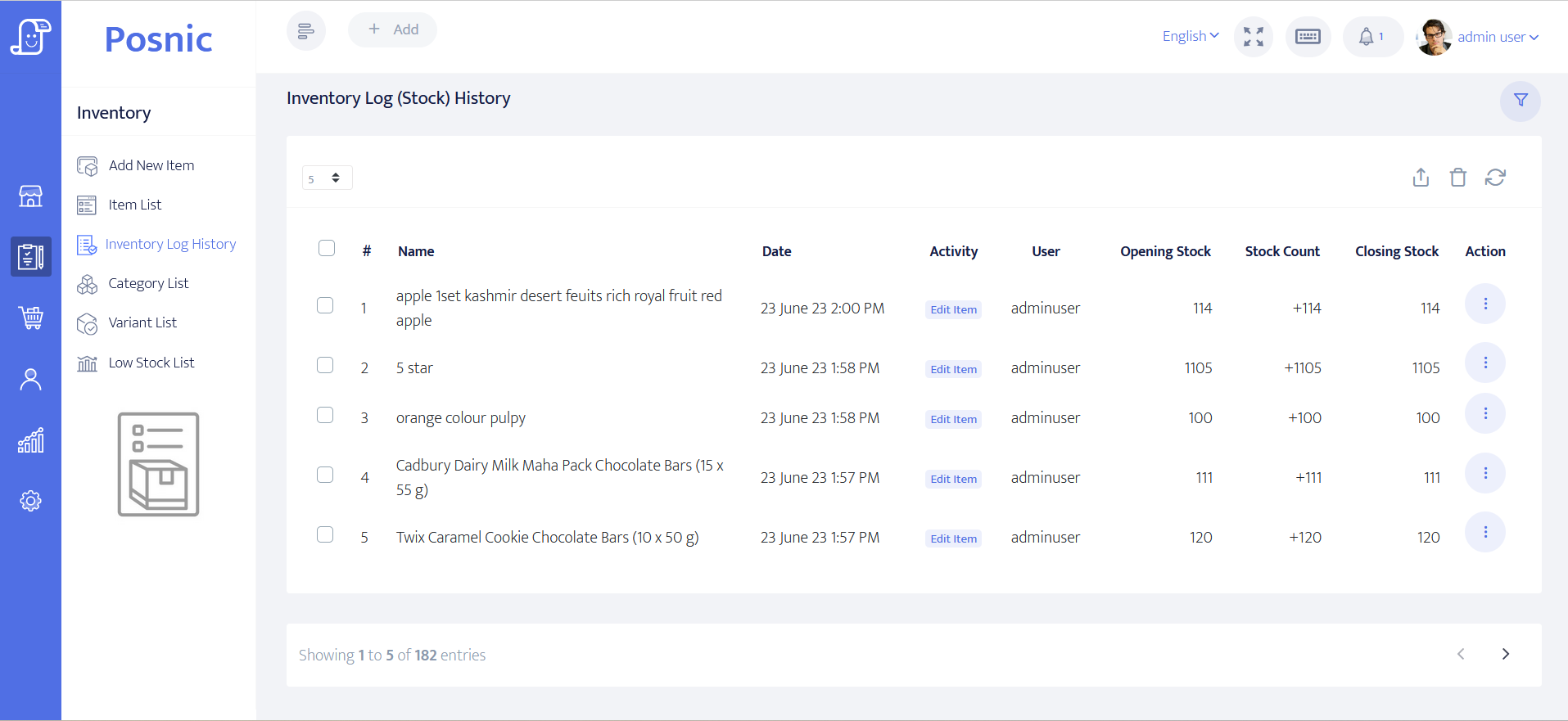
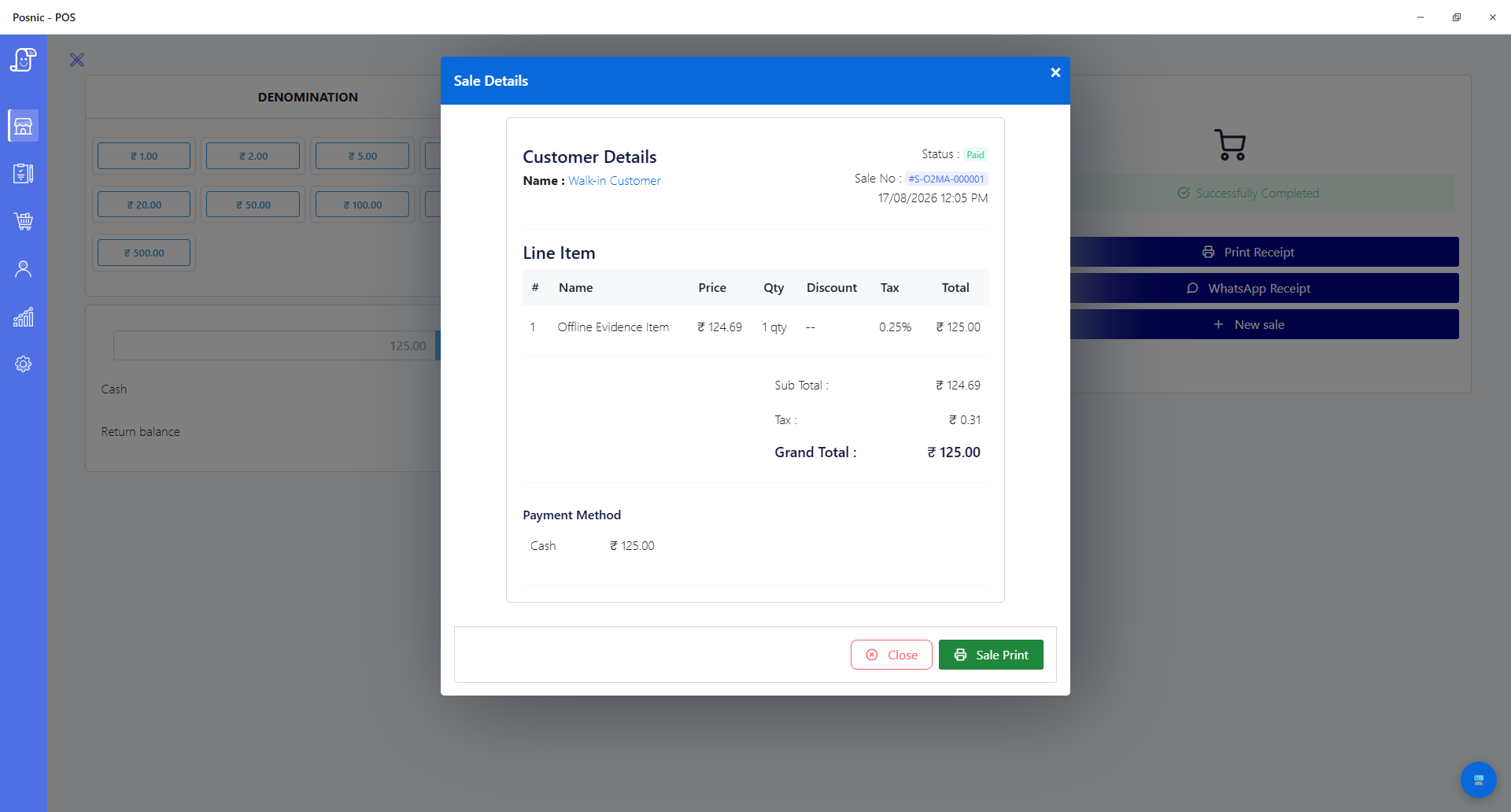
The pinned source exposes item, variant, quantity, sale, stock-log and report paths that can support a controlled mapping exercise. Those records are local POS evidence, not proof that a remote commerce platform reads or writes them correctly.
An ecommerce flag is not a connector
The reviewed item model includes an ecommerce Boolean field and the UI contains ecommerce-labelled surfaces. No accepted platform credential, catalogue publication, remote order, webhook, reservation or synchronization lifecycle was established behind that label.
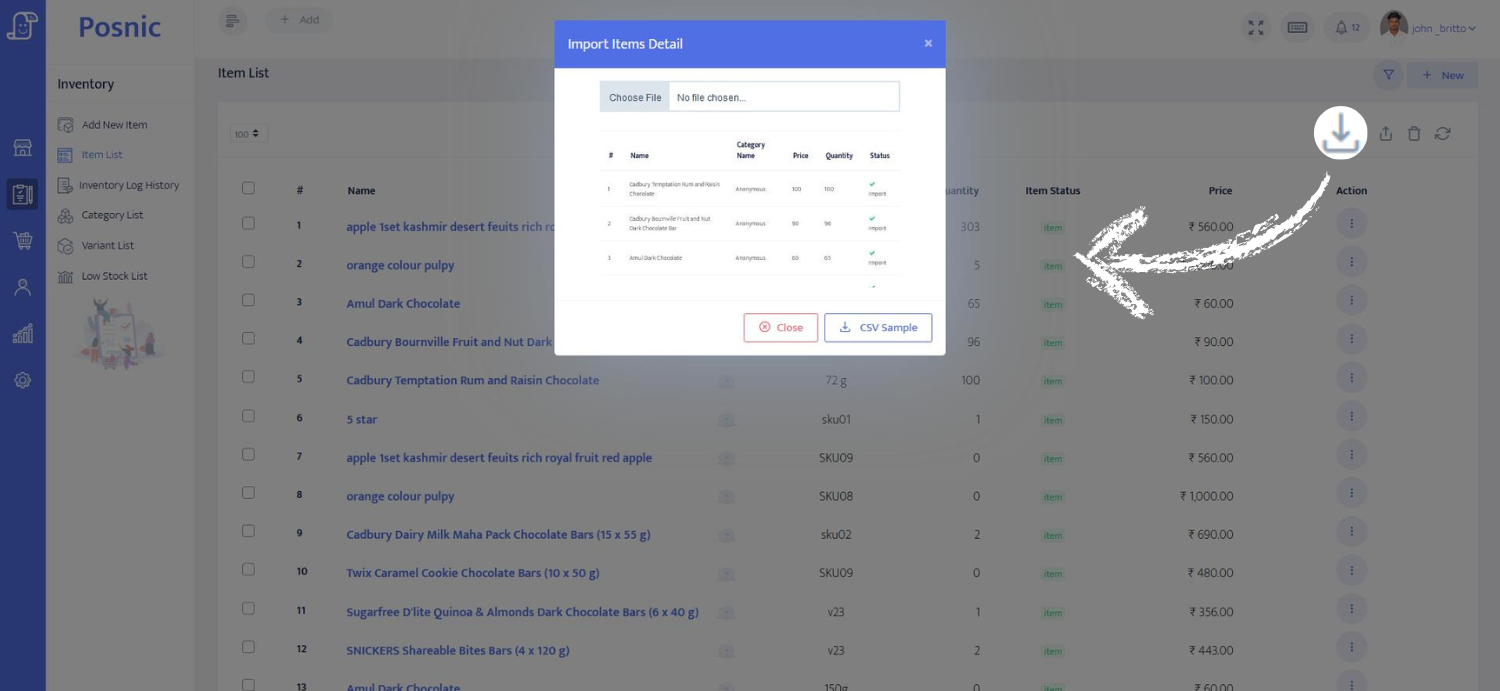
Import and export are batch tools
The API documentation lists item import and item, variant, sale and stock-log export routes. A CSV or exported report can support migration and reconciliation, but it does not provide continuous stock updates, ordering guarantees, retries or conflict resolution.
No named platform integration was found
Targeted review found no Shopify, WooCommerce or marketplace connector in the pinned release. Payment-provider webhooks elsewhere in the source are not ecommerce-order webhooks and must not be presented as one.
Supporting tests passed and failures remain visible
Nineteen selected supporting suites passed 2,110 tests. A broader selected run retained six sale-repository failures involving query expectations, document-number prefixes and a QR-order default. Neither result exercises an ecommerce connector.
Search demand is query-only evidence
Seven direct ecommerce-and-POS rows in the supplied Search Console exports produced 15 impressions and zero clicks. Generic fulfilment, logistics and place-only ecommerce rows were excluded; the exports contain no landing-page, country, device, position or conversion dimension.
Match each integration promise to an observable record
Treat the POS, commerce platform, payment provider and fulfilment tools as separate systems until an exact adapter proves how records move between them.
| Control | Minimum record | Current Posnic evidence | Acceptance decision |
|---|---|---|---|
| Product identity | Stable SKU or GTIN, platform product and variant IDs, barcode, tax class, price owner and lifecycle state. | Item and barcode fields exist; no accepted remote product-ID map was found. | Reject duplicate or ambiguous mappings and retain one export of the approved crosswalk. |
| Variant identity | Parent product, sellable variant, option values, platform variant ID and stock identifier. | Variant records and exports exist; no platform-specific variant mapping was accepted. | Test every representative size, colour or option without name-only matching. |
| Location and source of truth | POS branch, commerce location, fulfilment location, stock owner and authority for corrections. | Local branch and quantity paths exist; no accepted remote location map or ownership rule was found. | Name one writer per stock fact and block silent edits from the other system. |
| Availability and reservation | On-hand, damaged, allocated, safety stock, reserved and available-to-sell quantities with timing rules. | Quantity stock exists; no accepted ecommerce reservation or available-to-sell engine was found. | Do not publish a shared-stock promise until simultaneous counter and online cases reconcile. |
| Order ingestion and state | External order ID, channel, placed, authorized, paid, accepted, picked, fulfilled, cancelled and failed states. | Sale records exist; no named online-order ingestion or state map was accepted. | Replay every state and preserve the external ID through sale, fulfilment and correction. |
| Retries and idempotency | Event ID, signature result, received time, attempt count, processing result and dead-letter owner. | No accepted ecommerce webhook consumer or duplicate-delivery control was found. | Send duplicates, delays and out-of-order events; require one business result and an auditable exception. |
| Cancellation and return | Original order and line IDs, cancellation stage, returned quantity, refund, restock state and reason. | POS return paths exist; no accepted channel cancellation, refund or restock mapping was executed. | Test before and after fulfilment, partial return, non-sellable stock and retry. |
| Tax, discount and shipping | Jurisdiction, tax owner, inclusive or exclusive basis, discount source, shipping and rounding. | POS tax and discount fields exist; no platform-specific calculation parity was accepted. | Have tax and accounting owners reconcile representative baskets and corrections. |
| Payment and settlement | Provider payment ID, authorization, capture, fee, refund, dispute, payout and accounting reference. | POS payment records do not establish ecommerce-provider settlement reconciliation. | Keep card data with the validated provider and reconcile orders, refunds, fees and payouts. |
| Reconciliation and recovery | Checkpoint, expected and actual counts or values, exceptions, retry result, backup, restore and rollback owner. | Exports and bounded backup evidence exist; no live channel recovery was accepted. | Reconcile a known batch, interrupt dependencies, recover the backlog and restore on a clean test environment. |
Practical workflow
Start with identity, not synchronization
GS1 defines a GTIN as an identifier for trade items. It does not create a Posnic-to-platform mapping. Store the platform product and variant IDs beside stable internal identities, and reject duplicate, reused or name-only matches before any write is enabled.
Define one authority for each stock fact
On-hand, damaged, allocated, reserved, safety stock and available-to-sell are different quantities. Document which system owns each fact, which locations participate and whether manual edits are allowed before testing simultaneous sales.
Model the complete order state machine
Placed, authorized, paid, accepted, picked, fulfilled, cancelled, returned, refunded and disputed are not interchangeable. Preserve the external order and line IDs through every POS record, fulfilment handoff and correction.
Design for duplicate and delayed events
Shopify documents that webhook ordering is not guaranteed and delivery can fail, while its verification guidance identifies HMAC validation and duplicate event IDs. Use those as platform-specific engineering examples, not as evidence that Posnic ships a Shopify adapter.
Reconcile even when webhooks appear healthy
A successful HTTP response is not proof that products, orders, stock, refunds and settlements agree. Compare independent platform and POS snapshots by stable IDs and route every unexplained difference to a named owner.
Keep payment and recovery boundaries explicit
Use the payment provider's validated flow rather than handling account data casually. Plan dependency loss, backlog replay, backup, clean restore and rollback before a pilot, following the responsible providers and applicable local rules.
An eight-step ecommerce integration acceptance path
Run this path with synthetic products, customers, orders and payments in a disposable environment. A connector remains unaccepted until another person can reproduce the retained result.
Freeze the exact release and adapter
Record Posnic commit, platform, API version, adapter code, credentials, scopes, environment and owners before testing.
Build the identity crosswalk
Map SKU or GTIN, POS item, variant, barcode, platform product, platform variant and every participating location.
Choose stock ownership
Define on-hand, allocated, reserved, damaged, safety stock and available-to-sell formulas plus permitted writers.
Load a bounded catalogue
Create, update, disable and remap representative simple and variant items while retaining source and destination snapshots.
Exercise the order state machine
Run paid, unpaid, cancelled, partially fulfilled, returned, refunded, failed and disputed scenarios with stable external IDs.
Break event delivery
Send duplicate, delayed, out-of-order, malformed and invalid-signature events; inspect retries, dead letters and operator alerts.
Reconcile independent records
Compare products, orders, quantities, tax, discounts, shipping, payments, fees, refunds and physical stock for a known batch.
Recover and approve
Interrupt dependencies, replay the backlog, restore an off-machine backup on a clean environment and record named sign-off or open gaps.
What the integration pilot must include
Hardware
- The exact POS computer and operating system used for the pilot.
- The exact scanner, printer and other counter devices used in representative sales and returns.
- A separate clean environment for restore and rollback testing.
- An off-machine backup destination controlled by a named owner.
- Network and power interruption methods that do not endanger production data.
Software and data
- Exact Posnic release and source commit plus the exact adapter build.
- Named commerce platform, store, API version, credentials, scopes and test environment.
- Versioned product, variant, location, order, tax, discount, shipping, payment and return mappings.
- Webhook or polling logs with signatures, event IDs, attempts, results and dead-letter ownership.
- Independent exports for reconciliation plus documented backup, restore, replay and rollback procedures.
Setup sequence
- Record the installed Posnic release, source commit, platform, API version and adapter build.
- Assign business, technical, security, payment, tax, accounting and fulfilment owners.
- Create a synthetic catalogue with a simple item, variants, duplicate names, disabled item and two locations.
- Map every POS item and variant to stable platform identifiers; reject name-only matching.
- Define stock ownership and the exact available-to-sell formula before enabling writes.
- Test catalogue create, update, disable, remap and failed-validation behavior.
- Test paid, unpaid, cancelled, partial, returned, refunded, failed and disputed orders.
- Send duplicate, delayed, out-of-order, malformed and invalid-signature events.
- Reconcile POS, platform, payment-provider and physical records for a known batch.
- Interrupt the platform, adapter, network and POS in turn; recover and replay without duplication.
- Restore an off-machine backup on a clean environment and verify the same control totals.
- Keep every observation and decision blank until named owners inspect the evidence.
What each person sees
Catalogue owner
Needs stable item, variant and location mappings plus a controlled way to resolve duplicates and discontinued products.
Store and fulfilment staff
Need clear order source, state, allocation, cancellation, return and exception records without silently changing remote stock.
Technical and security owner
Needs scoped credentials, signature verification, idempotency, retries, dead letters, logs, alerts and a reproducible deployment.
Finance and business owner
Needs orders, tax, discounts, shipping, payments, fees, refunds, settlements and stock differences reconciled before approval.
Product evidence to inspect
Mistakes to avoid
Avoid these during rollout
- Calling an ecommerce flag, UI tab, CSV file or API route a working connector.
- Mapping products or variants by display name instead of stable identifiers.
- Allowing POS and platform users to overwrite the same stock fact without conflict rules.
- Treating on-hand quantity as available-to-sell without reservation and safety-stock rules.
- Creating a second sale when the same event is delivered twice.
- Assuming webhook order or delivery guarantees that the platform does not make.
- Returning cancelled or damaged goods directly to sellable stock.
- Marking a request successful before downstream stock, payment and order records commit.
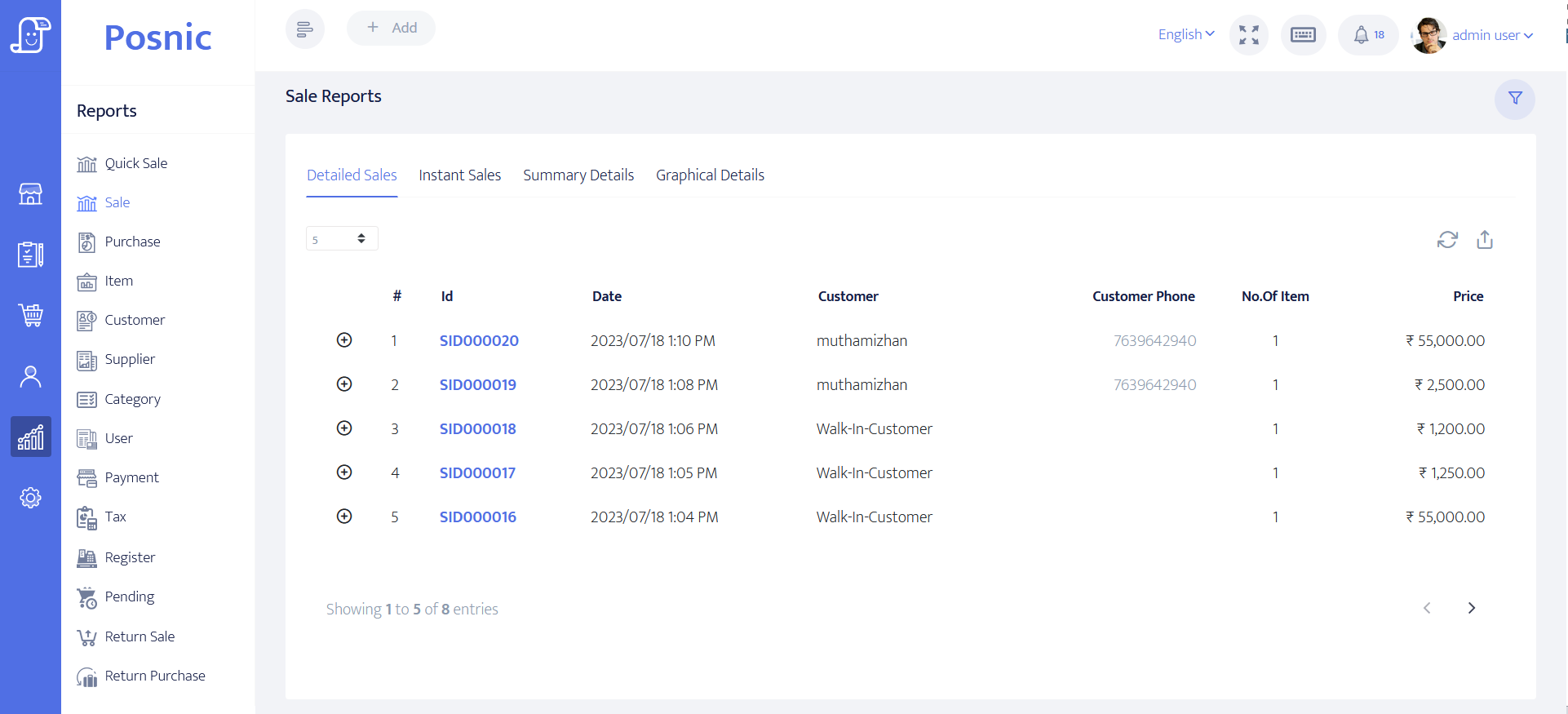
- Treating a sales export as payment-provider or accounting reconciliation.
- Going live without backlog replay, clean restore, rollback and named exception owners.
Run the 22-control ecommerce integration acceptance record
Record platform identity, credentials, mappings, stock ownership, order states, event failures, payments, returns, reconciliation, recovery and owner approval. Observation and decision fields stay blank until the exact integration is exercised.
Primary sources used
Pinned Posnic item model
Item identity, barcode, SKU, quantity, tax, price and ecommerce-labelled fields reviewed at the exact commit.
Pinned Posnic variant model
Variant identity and option records used to define the mapping boundary.
Pinned Posnic sale model
Local sale, line, payment and return-related fields; not an online-order connector.
Pinned Posnic API inventory
Generated route inventory showing batch import and export surfaces used in the review.
GS1 Global Trade Item Number
Official trade-item identity standard used to frame stable product mapping; it does not establish a Posnic integration.
Shopify inventory management apps
Official platform-specific model for inventory items, levels and locations; no Posnic certification is implied.
Shopify webhook guidance
Official platform-specific delivery, ordering and reconciliation constraints used to design failure tests.
Shopify webhook verification
Official HMAC verification and duplicate-event guidance used as an implementation example.
WooCommerce REST API
Official platform-specific authentication and resource API reference; no Posnic connector is claimed.
WooCommerce webhook guidance
Official event, delivery, signature and log reference used to frame adapter tests.
PCI SSC merchant process
Official merchant guidance for protecting payment-account data and selecting validated payment solutions.
NIST contingency planning
Primary recovery-planning model used to structure outage, backlog, restore and restart tests.
GNU Affero General Public License
Official license text for the open-source Posnic release; connector code and third-party terms require their own review.
Questions
Does the archived Posnic evidence include a Shopify connector?
No accepted Shopify connector was found in the pinned release. Shopify documentation on this page supplies platform-specific acceptance questions, not a Posnic compatibility or certification claim.
Does the archived Posnic evidence include a WooCommerce connector?
No accepted WooCommerce connector was found in the pinned release. Test an exact adapter, API version, credentials, mappings, events, retries and reconciliation before any rollout.
Does the ecommerce field mean products synchronize online?
No. A Boolean field or ecommerce-labelled screen does not establish catalogue publication, remote order ingestion, reservation, webhook handling or continuous stock synchronization.
Can CSV import and export be used instead?
They can support a controlled migration, manual handoff or reconciliation record. They do not provide real-time delivery, ordering, idempotency, conflict resolution or automatic recovery.
Can counter and online sales share one stock quantity?
Only after the exact integration defines stock ownership, locations, reservation, safety stock, event timing, failures and reconciliation and passes simultaneous-sale tests.
How should duplicate webhooks be handled?
Verify the provider signature, retain the provider event ID and make processing idempotent so repeated delivery creates one business result. Keep failed events and retries observable.
When should an online cancellation return stock?
That depends on whether stock was reserved, allocated, picked, fulfilled or returned and whether the item remains sellable. Define and test every state instead of applying one automatic rule.
What should be reconciled each day?
Compare platform products and orders with POS sales, stock movements, cancellations, returns, tax, discounts, shipping, provider payments, fees, refunds, payouts and physical exceptions by stable IDs.
What must pass before production?
The exact release and adapter must pass identity, stock, order-state, duplicate, out-of-order, invalid-signature, payment, return, reconciliation, outage, backlog, restore and rollback controls with named owner approval.
Where Posnic fits
Posnic Community Edition can be evaluated as one local POS endpoint for item, variant, sale, quantity, import, export and report records. It does not ship an accepted Shopify, WooCommerce or marketplace connector in the reviewed archived evidence. Do not promise shared catalogue, online-order ingestion, reservation, inventory synchronization, channel reconciliation or payment settlement until an exact adapter passes the acceptance record.